Tutorial : Protect a Patch with a password
Protecting a patch is simple in Usine. It can be useful to avoid modifications of the structure or to hide the content.
Add a Password Module
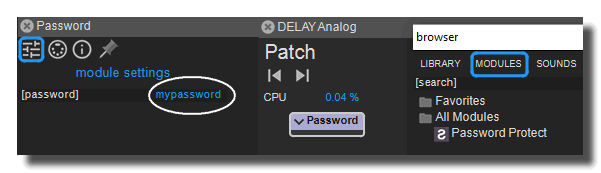
Just add a password module to the patch you want to protect. Then, set the password in the settings-panel.
Finally a password prompt will appear when you want to edit the structure of the patch.
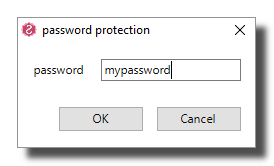
The prompt window appears only once on each sessions.
See also
- Setup tab Kiosk
- Tutorial : Create Stand-Alone Application
- Tutorial : Protect a Patch with a password
- Patch Password Protect
Tutoriel Usine
- Tutorial : Basic Commands you have to know
- Tutorial : Patching
- Tutorial : Audio Plug-ins
- Tutorial : The Grid
- Tutorial : The Light Engine
- Tutorial : The Video Engine
- Tutorial : Use Modular
- Tutorial : Record audio
- Tutorial : Interface Builder (IB)
- Tutorial : Use the Mixer Panel
- Tutorial : Use the Playlist
- Tutorial : Create Stand-Alone Application
- Tutorial : Protect a Patch with a password
- Tutorial : Create Help File for a Patch
- Tutorial : Remote control of Usine from Internet
- Tutorial : Global Arrays
- Tutorial : Use Procedures
- Tutorial : Laser Engine
- Tutorial : How to use Chunks
- Tutorial : How to use the MCP server in Usine
- Tutoriel : Comprendre Usine
- Tutoriel : Assignations MIDI & clavier
- Tutoriel : Surround
- Tutoriel : Customisation de l'interface
- Tutoriel : OSC (Open-Sound-Control)
- Tutoriel : Moteur physique
- Tutoriel : Arduino
- Tutorial : Utiliser les Clusters
- Tutorial : Utiliser les VCA's
- Tutorial : Le Pixel Mapping
version 7.0.250921
Edit All Pages