Objects Address
All objects in Usine (panels, modules, etc.) have an internal address that can be used to access their properties from a script or an OSC message.
The object address is visible in the settings/remote tab.
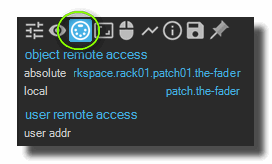
There are 3 kinds of remote addresses:
- Absolute: The absolute remote address. It's a global address visible from anywhere inside a Usine script or from an OSC command.
- Local: Only visible inside the current patch in a script.
- User: A global address (visible from anywhere) set manually by the user.
The absolute and local addresses of modules can be changed by editing their caption with an [alt+click]. 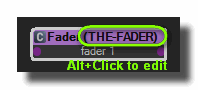
OSC messages
To set the object value from an OSC message, simply send a message to Usine with the following OSC address syntax: /uobject/absolute-address or /uobject/user-address.
In the example above: /uobject/usine.workspace.rack001.patch001.the-fader.
From a script
Please refer to this script page.
See also
version 7.0.250921
Edit All Pages