Tutorial : Use the Mixer Panel
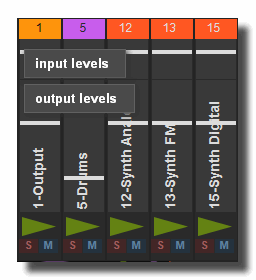
The mixer-panel provides an efficient way to create a mixer view for all audio racks.
the mixer panel can't be user to mix video or light racks.
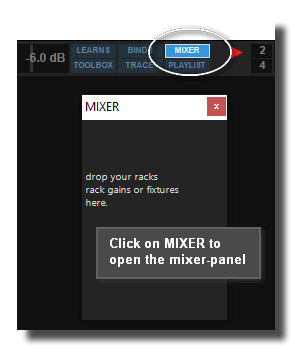
Open the mixer-panel by clicking on the [MIXER] button of the master-panel.
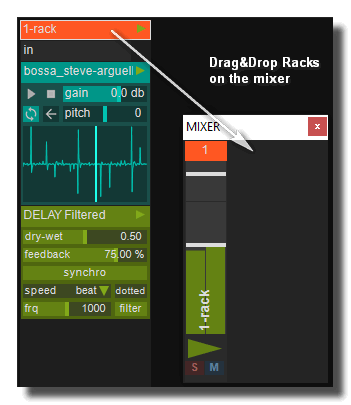
Drag&Drop any audio racks on the mixer-panel to create a slot.
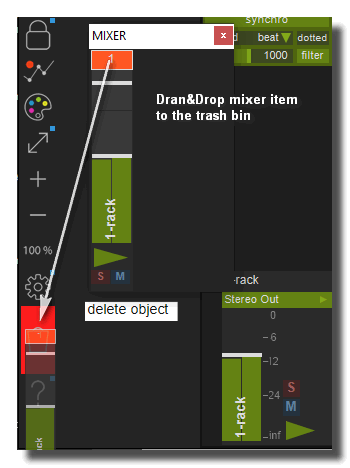
To delete mixer slots drop it into the trash bin.
See also
- Learns Panel
- Audio Recorder Panel
- Mixer Panel
- Playlist Panel
- Trash Panel
- Browser Panel
- Convolver Panel
- Trace Panel
- Tutorial : Record audio
- Tutorial : Use the Mixer Panel
Tutoriel Usine
- Tutorial : Basic Commands you have to know
- Tutorial : Patching
- Tutorial : Audio Plug-ins
- Tutorial : The Grid
- Tutorial : The Light Engine
- Tutorial : The Video Engine
- Tutorial : Use Modular
- Tutorial : Record audio
- Tutorial : Interface Builder (IB)
- Tutorial : Use the Mixer Panel
- Tutorial : Use the Playlist
- Tutorial : Create Stand-Alone Application
- Tutorial : Protect a Patch with a password
- Tutorial : Create Help File for a Patch
- Tutorial : Remote control of Usine from Internet
- Tutorial : Global Arrays
- Tutorial : Use Procedures
- Tutorial : Laser Engine
- Tutorial : How to use Chunks
- Tutoriel : Comprendre Usine
- Tutoriel : Assignations MIDI & clavier
- Tutoriel : Surround
- Tutoriel : Customisation de l'interface
- Tutoriel : OSC (Open-Sound-Control)
- Tutoriel : Moteur physique
- Tutoriel : Arduino
- Tutorial : Utiliser les Clusters
- Tutorial : Utiliser les VCA's
- Tutorial : Le Pixel Mapping
version 7.0.250921
Edit All Pages