Devices Panel
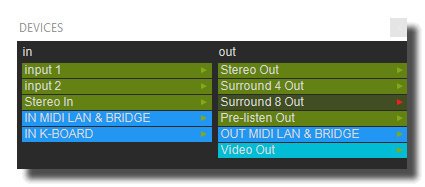
All connected hardware devices are grouped in the Devices Panel. Any kind of Audio, MIDI, OSC, Video devices can be created.
Each Device (which is internally a patch), can contain several pre-processing, like an EQ on a microphone input or MIDI channel transformations on connected controller.
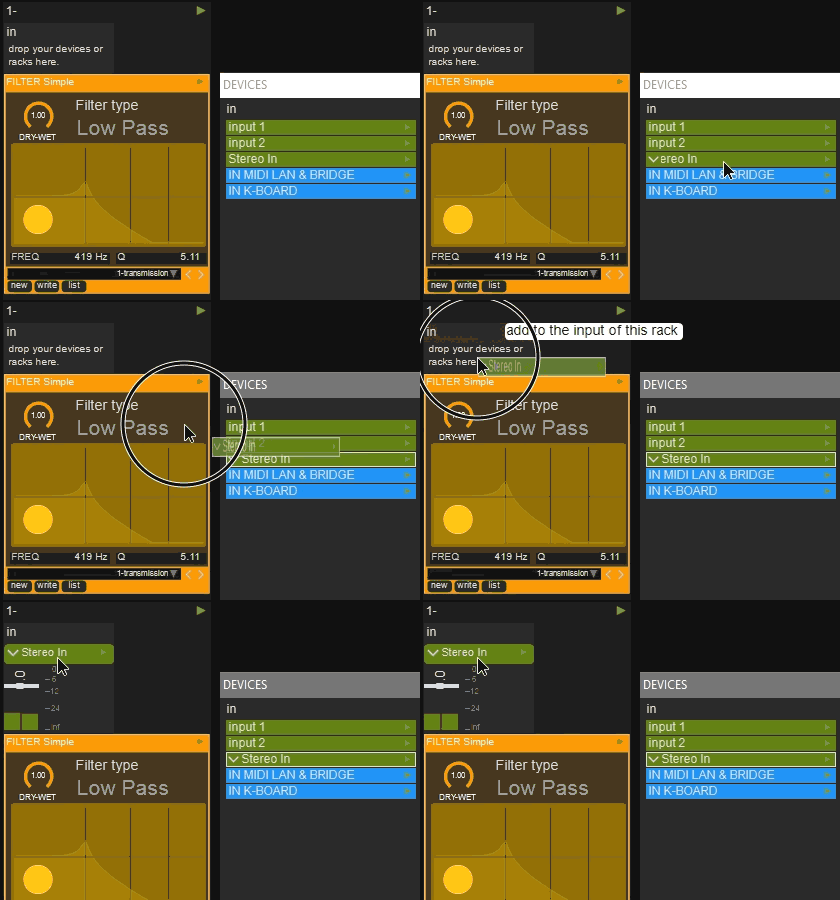
Then just Drag & Drop those Devices onto the rack-input or the rack-output.
Data and OSC devices can be easily used with the Binds. See how to use binds in osc tutorial.
threaded devices
Some devices have the threaded patch option. When enabled, Usine executes devices in a separated thread.
This option concerns only the following devices types:
- video in,
- data in,
- OSC in,
- data out,
- OSC out
Can reduce CPU load and the impact to the audio chain, for example, if you have big OSC in/out devices.
Commands
add AUDIO in
Creates a new audio in Device.
add MIDI in
Creates a new MIDI in Device.
add DATA in
Creates a new data in Device.
add OSC in
Creates a new OSC in Device.
add VIDEO in
Creates a new Video in Device (camera).
add AUDIO out
Creates a new audio out Device.
add MIDI out
Creates a new MIDI out Device.
add DATA out
Creates a new data out Device.
add OSC out
Creates a new OSC out Device.
add VIDEO out
Creates a new Video out Device.
open device
Opens a previously saved device.
clear all devices
Reset the current Devices set.
open devices set
Opens a Devices set you saved before.
save devices set as
Saves the current Devices set into a file, to recall it later.
Settings
always create default
Creates automatically the input 1, input 2, Stereo In and Stereo Out devices when Usine starts.
always create surround
Creates automatically the Surround 4 Out, Surround 8 Out and Surround 16 Out devices when Usine starts.
See also
version 7.0.250921
Edit All Pages