Master Light Panel
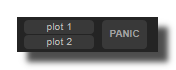
Master commands for the light engine.
Once the Light engine has been activated in the setup panel, the Master Light Panel appears in the top header of Usine.
plot
Displays or hides the plot-panel 1, 2, etc. The number of plots is set by num of plots in the setup-light.
panic
Sets to 0 the parameters set as master of all the fixtures of all plots, to switch OFF all fixtures.
This button can be hidden, see below.
saved in preset
Determines if parameters of this object are saved in the preset-panel.
fade preset
Parameters of the this object can cross faded when you recall a preset in the grid.
Optional setting, does not appear on all objects.
Customize Interface
Choose which elements are visible in the panel.
show panic
Displays the panic button.
See also
- Master Light Panel
- Fixtures Group Panel
- Plot Panel
- Fixture Panel
- Light RGB Chaser
- Light Random RGB LED Color
- Light Envelop Chaser
- Light Random Peak Chaser
- Light MIDI to Dimmer (SUB-PATCH)
- Setup onglet Lumière
- Tutorial : Le Pixel Mapping
- Tutorial : The Light Engine
- Light
- Light Direct ArtNet sACN Array
- Light Send Channel Name
- Light ArtNet sACN Input
- Light Direct DMX Array
- Light Plot Channels List
- Light Color Array to ArtNet
- Light Fixture
- Light Clear Channel
- Light Direct DMX Channel
- Video to Color Array
- Video to Data Array
- Video Pixel Mapper
- Color Array to Video
- Array Chaser
- Usine Master Light Settings
- Bus Set DMX
- Bus Get DMX
- Master Synchro Panel
- Top Header Panel
- Master Panel
- Usine Master Settings
- Usine Master Vu Meters
version 7.0.250921
Edit All Pages