Audio Stretch Panel
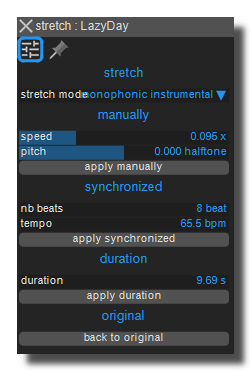
Changes the tempo, the length or the pitch of a sample.
stretch mode
Choose between several processing modes, according to your sample family:
- 0 Piano
- 1 smooth
- 2 multitimbral texture
- 3 percussion with stable notes
- 4 monophonic instrumental
- 5 solo percussion
manually
speed
Adjusts the speed of the selected sample, from 0.01 to 16 (1 = original speed).
pitch
Changes the pitch of the selected sample, from -48 to +48 half-tones.
apply manually
Applies the speed, pitch to the selected sample.
synchronized
nb beats
Number of beats the selected sample must last at the tempo below, from 1 to 256 (default 8).
tempo
Tempo used to calculate the length of the sample, in bpm (by default the current tempo).
apply synchronized
Applies the beats number and tempo to the selected sample.
duration
duration
Length the selected sample must have, in seconds.
apply duration
Applies the duration to the selected sample.
original
back to original
Back to original sample (undo the stretch).
Note that each time you stretch a file, a new wave file is created with a new name in the same folder than the original file.
The new name reflects the changes, for example,
for a speed = 1.6, the pitch = -3 half-tones,
the stretch mode 4 for 4 monophonic instrumental,
nb beats = 8, tempo = 120 and duration = 10 s.
my groove.wav will become
my groove.wav.usinestretch@1.600000@-3.0000@4@8@120.00@10.000@.wav
See also
version 7.0.250921
Edit All Pages