Use Quick-Links
Quick-Links are an efficient way to create connections inside a patch. They can send/receive any type of flows (data, audio, video, text, array, MIDI) and are more CPU friendly than wires or buses.
Create a Quick-Link
A Quick-Link is made of one QuickLink Set module, which receives the flow on its inlet, and one or more QuickLink Get modules, which output it. A Get module receives the flow of the Set module that has the same name (QL by default). Both modules are in the bus category of the browser.
Faster, from the templates-panel: create a wire from an outlet, release it in an empty zone of the patch and choose Quicklink Set: the module is created, connected and named after the outlet. From an inlet, choose QuickLink Get and select one of the existing Quick-Links.
A Quick-Link is only visible to the main patch (including all its sub-patch), but it cannot be used to communicate between racks or different patches in a rack.
Unlike wires Quick-Links can be delayed by one calculation BLOC depending on the calculation order, not predictable.
For example, the following audio chain will introduce an additional latency of one calculation BLOC (generally 128 samples).
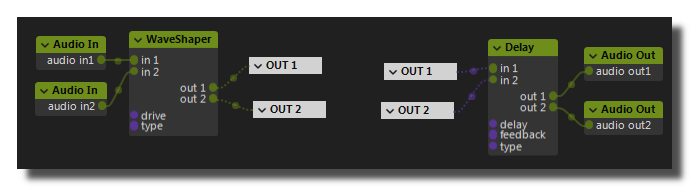
multiple inputs connections are not allowed
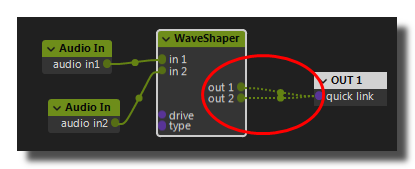 not allowed
The solution is to use a + module like:
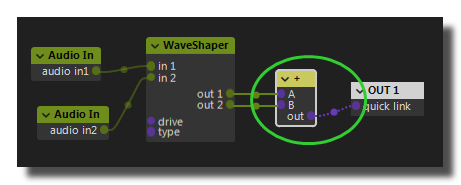 allowed
See also
- Empty Sub-Patch (SUB-PATCH)
- Tutorial : Patching
- Using Drag & Drop
- Manipulate Bitmaps
- Flow types
- Manipulate Comma-Text
- Use Quick-Links
- Get Multi-touch and Gesture info
- Patching délai interactif
- Commandes de Patching
- Créer des Sub-Patches
- Usine Object Get
- Usine On OSC Receive
- Usine On MIDI Receive
- Patching
- Flow Resample
- Flow Pass if Changed Multi
- Patch Send Internal Message
- Flow Wait Multi
- Patch Password Protect
- Flow Freeze Multi
- Patch On Initialization
- Flow to Data Rate
- Flow Resample Multi
- Flow Pass Multi
- Flow Freeze
- Poly Current Voice Number
- Poly Array value
- Flow Collection Stack
- Flow Collection Circular Buffer
- Flow Collection Queue
- Flow Track Hold
- Flow Stop
- Flow Wait
- Flow Swap
- Patch On Activation
- Flow Pass
- Flow Stop Multi
- Flow Thru Multi
- Flow From 1 to 0
- Patch ON-OFF
- Poly Sub-Patch Polyphony
- Flow Collection List
- Patch Comment
- Flow Pass if Changed
- Flow Toggle
- Poly Voice Dispatcher MIDI
- Flow Thru
- Poly Voice Dispatcher MPE
- Flow Is NULL
- Patch Info Editor
- Patch On DeActivation
- Flow to Audio Rate
- Patch Bypass
- Flow Sample Hold
- Flow From 0 to 1
- Flow Has Changed
version 7.0.250921
Edit All Pages