Tutorial : How to use Chunks
Chunks are Usine's global data storage system. They let you store, retrieve, and share data between modules — even across different patches and racks. Think of them as a shared dictionary that any module in your workspace can read from and write to.
What are Chunks?
A chunk is a named container that holds one or more items. Each item has a name and a value. Values can be of different types: float, integer, text, or color. Items can also hold arrays of these types.
Here's a simple analogy: imagine a filing cabinet (the chunk system). Each drawer has a label (the chunk name). Inside each drawer, there are folders (the items), each with its own label (the item name) and contents (the value).
Chunk System
  ├── "my-synth" (chunk)
  │     ├── "cutoff"  = 0.75       (float item)
  │     ├── "resonance" = 0.3      (float item)
  │     └── "preset-name" = "warm pad" (text item)
  │
  └── "scene-data" (chunk)
        ├── "volumes" = 0.5,0.8,0.6,1.0  (float array item)
        └── "active-color" = $FF00AAFF    (color item)
Chunk names and item names are case-sensitive: MyChunk is different from mychunk and MYCHUNK.
Item names must not contain regular-expression special characters: ^ . $ * + ? ( ) [ ] { } \ |
Why use Chunks?
Advantages
- Cross-patch communication: share data between modules that live in different patches, racks, or even different parts of your workspace — without wiring them together.
- Decoupled architecture: modules don't need to know about each other. A module just writes to a chunk name, and any other module reading that chunk gets the update.
- Persistence: chunk data lives as long as the workspace is open. You can also export chunks to files and import them back later.
- Reactive updates: modules can subscribe to chunk changes and get notified automatically when data changes, without polling.
- Multiple data types: store floats, integers, text strings, colors, and arrays of all these types.
- Pattern matching: use regular expressions to read or watch multiple items at once (e.g., all items starting with
"track-").
Limitations
- Not for audio streams: chunks are designed for control data, parameters, and metadata — not for streaming audio buffers in real-time. For audio, use standard audio wires.
- Global namespace: all chunks share the same global space. Choose descriptive, unique names to avoid collisions (e.g.,
"my-synth-cutoff"rather than just"cutoff"). - No automatic cleanup: chunks persist until you explicitly destroy them or close the workspace. Unused chunks stay in memory.
- Thread-safe but not instant: chunk updates go through a message queue, so there may be a tiny delay (typically 25ms) before a subscribed module sees the change.
The Chunk Modules
Usine provides 7 dedicated chunk modules, found in the browser under Chunks:
| Module | Purpose |
|---|---|
| chunk-item-operation | Create, modify, delete, or clear chunk items |
| chunk-item-get | Read item values from a chunk |
| chunk-item-get-concat | Read items and concatenate them into a single array |
| chunk-watch | Get a trigger when a chunk or item is modified |
| chunk-get-list | List all existing chunks |
| chunk-get-items-list | List all items inside a chunk |
| chunk-files | Import/export chunks to and from files |
Step by Step: Writing and Reading a Chunk
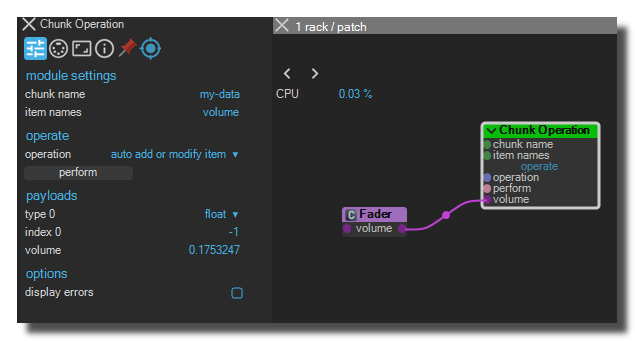
Step 1 — Write a value with Chunk Item Operation
- Add a chunk-item-operation module to your patch.
- Set the chunk name to
my-data. - Set the item names to
volume. - Set the operation to
add or modify item. - Set the type to
float. - Connect a fader or any data source to the payload inlet.
- Click the perform button (or use
auto add or modify itemto write automatically when the payload changes).
You've just created a chunk called my-data with an item volume inside it.
Step 2 — Read the value with Chunk Item Get
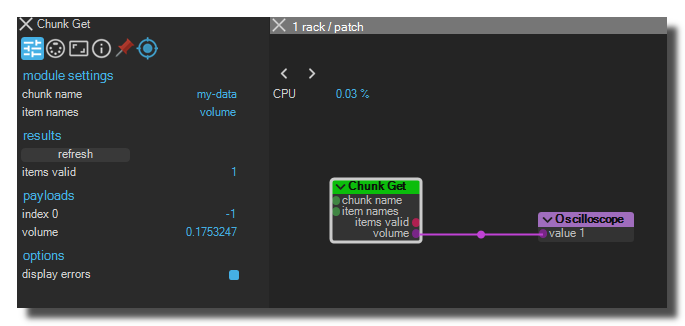
- In a different patch (or even a different rack), add a chunk-item-get module.
- Set the chunk name to
my-data. - Set the item names to
volume.
The module's payload outlet now outputs the current value of the volume item. If the value changes in the writer module, the reader automatically updates.
Step 3 — Watch for changes with Chunk Watch
- Add a chunk-watch module.
- Set the chunk name to
my-data. - Optionally set the item names to
volume(leave empty to watch all items in the chunk).
The modified trigger outlet fires a trigger pulse every time the watched chunk item is modified. You can connect this trigger to any module that needs to react to the change.
Operations Reference
The chunk-item-operation module supports these operations:
| Operation | Description |
|---|---|
| add or modify item | Creates the item if it doesn't exist, or updates its value. Click perform to execute. |
| auto add or modify item | Same as above, but executes automatically whenever the payload inlet changes. |
| clear item | Sets the item's array size to 0 (or string to empty). The item still exists but has no content. |
| delete item | Completely removes the item from the chunk. |
| clear chunk | Clears all items in the chunk (items remain but with empty content). |
| destroy chunk | Completely removes the chunk and all its items from the system. |
Working with Arrays
Chunk items can store arrays of values. The index control determines how you access them:
- index = -1: read or write the entire array at once.
- index = 0, 1, 2, ...: read or write a single element at that position.
This is useful for storing sequences, parameter sets, or any multi-value data.
For example, to store a list of 8 step values for a sequencer:
- Use a chunk-item-operation with index = -1.
- Connect an array of 8 values to the payload inlet.
- The entire array is stored as one item.
To retrieve a single step:
- Use a chunk-item-get with index set to the step number (0-7).
Using Regular Expressions
When specifying item names, you can enable regular-expression mode to match multiple items at once:
| Pattern | Matches |
|---|---|
^track-.* |
All items starting with track- |
.*-volume$ |
All items ending with -volume |
(?i)^lead |
All items starting with lead (case-insensitive) |
step-[0-9]+ |
Items like step-0, step-1, step-42, etc. |
This is particularly powerful with chunk-item-get and chunk-watch when you want to monitor a whole group of related items.
Saving and Loading Chunks to Files
The chunk-files module lets you persist chunk data to disk:
- Export: saves chunk data to a text file. Each item is stored with a section header
[chunk-name$item-name]. - Import: loads chunk data from a file back into the system.
Options:
- clear chunk before import: empties the chunk before loading new data (recommended to avoid stale items).
- export mode: choose between
rewrite file(overwrite everything) orupdate file(only add or update the specified chunks).
Use Case: Centralized Mixer Preset System
Here's a practical example that demonstrates the power of chunks.
Goal: build a mixer with 4 tracks where all volume and mute states can be saved and recalled as presets, even if each track lives in a different patch.
The Mixer Tracks (in separate patches)
In each track patch (Track 1, Track 2, Track 3, Track 4):
- Add your audio processing chain as usual.
- Add a chunk-item-operation module:
- chunk name:
mixer-state - item names:
track-1-volume(ortrack-2-volume, etc.) - operation:
auto add or modify item - type:
float - Connect your track's volume fader to the payload inlet.
- chunk name:
- Add another chunk-item-operation for the mute state:
- chunk name:
mixer-state - item names:
track-1-mute - operation:
auto add or modify item - type:
float - Connect your track's mute switch to the payload inlet.
- chunk name:
Each track now automatically writes its volume and mute state to the shared mixer-state chunk.
The Preset Manager (in a control patch)
In a separate "Preset Manager" patch:
-
Add a chunk-files module:
- chunk name:
mixer-state - Connect buttons to export direct and import direct.
- Set filename to your preset file path (e.g.,
preset-A.txt). - Enable clear chunk before import to get a clean state on recall.
- chunk name:
-
To read back the saved values into each track, add a chunk-item-get in each track patch:
- chunk name:
mixer-state - item names:
track-1-volume(matching the track) - Connect the payload outlet back to the volume fader.
- chunk name:
-
Add a chunk-watch:
- chunk name:
mixer-state - Use the modified trigger outlet to trigger visual feedback when a preset is recalled.
- chunk name:
How it works
- During normal operation, each track's volume and mute changes are automatically written to the
mixer-statechunk. - When you click export, the entire mixer state is saved to a file.
- When you click import, the file is loaded into the chunk, and every track's chunk-item-get module instantly picks up the new values.
- The chunk-watch module fires a trigger so you can flash a LED or display a message confirming the preset was loaded.
This pattern scales to any number of tracks and parameters. You could extend it with track-1-pan, track-1-eq-low, etc., all stored in the same chunk.
Tips
- Name your chunks clearly: use prefixes like
mixer-,synth-,scene-to organize your data and avoid collisions. - Use auto mode wisely:
auto add or modify itemwrites on every change, which is convenient but generates more notifications. For high-frequency data, consider using manualperformtriggers. - Combine with procedures: you can use chunks inside procedure modules for algorithmic data processing.
- Debug with Chunk Get List: use chunk-get-list and chunk-get-items-list to inspect what's currently stored in the chunk system.
See also
- Tutorial : How to use Chunks
- Chunk Watch
- Chunk File
- Chunk Get Items List
- Chunk Item Get
- Chunk Item Operation
- Chunk Item Get Concat
- Chunk Get List
Tutoriel Usine
- Tutorial : Basic Commands you have to know
- Tutorial : Patching
- Tutorial : Audio Plug-ins
- Tutorial : The Grid
- Tutorial : The Light Engine
- Tutorial : The Video Engine
- Tutorial : Use Modular
- Tutorial : Record audio
- Tutorial : Interface Builder (IB)
- Tutorial : Use the Mixer Panel
- Tutorial : Use the Playlist
- Tutorial : Create Stand-Alone Application
- Tutorial : Protect a Patch with a password
- Tutorial : Create Help File for a Patch
- Tutorial : Remote control of Usine from Internet
- Tutorial : Global Arrays
- Tutorial : Use Procedures
- Tutorial : Laser Engine
- Tutorial : How to use Chunks
- Tutoriel : Comprendre Usine
- Tutoriel : Assignations MIDI & clavier
- Tutoriel : Surround
- Tutoriel : Customisation de l'interface
- Tutoriel : OSC (Open-Sound-Control)
- Tutoriel : Moteur physique
- Tutoriel : Arduino
- Tutorial : Utiliser les Clusters
- Tutorial : Utiliser les VCA's
- Tutorial : Le Pixel Mapping
version 7.0.250921
Edit All Pages