File Collection Panel
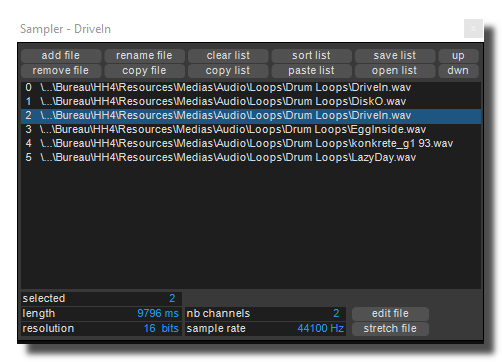
Files list management panel.
The list shows the files of the module (for example a video, image or laser player), one file per line with its number:
- click a line to select the file,
- drag a line to move it in the list,
- drop files or a folder onto the list to add them (only the file types accepted by the module are added), or drop a saved list file to load it,
- double-click an audio file to pre-listen to it.
If files are Audio type, it gives you an access to the wave editor and to the audio-stretch-panel.
Commands
add
Adds a new file in the list.
remove
Removes the selected file.
rename
Renames the selected file on the disk.
copy
Copies/duplicates the selected file with another name. The line of the list then points to the copy.
clear list
Clears the list.
copy list
Copies the list to the clipboard.
sort list
Sorts the list in alphabetic order.
paste list
Replaces the list with the list previously copied with the copy list command.
save list
Save the list to a file.
open list
Opens a previously saved file.
up
Moves the selected file up in the list.
dwn
Moves the selected file down in the list.
Settings
selected
Selected file number in the list.
length
Length in Milliseconds of the selected sample (audio files only).
resolution
Bit resolution of the selected sample (audio files only).
nb channels
Number of channels of the selected sample (audio files only).
sample rate
Indicates the sample rate of the selected sample (audio files only).
edit file
Opens the wave editor chosen in the setup-global (audio files only).
stretch file
Opens the audio-strecth-panel to change the tempo, pitch or length of the current audio sample (audio files only).
See also
- File Collection Panel
- Files
- File Zip
- Filename Delete Extension
- File Delete
- Filename Usine Path
- File Rename
- File Copy
- Filename Path Delimiter
- File UnZip
- File List Manager
- Filename Extract Name
- Filename Get Temp Folder
- File Save Text File
- File Open Text File
- File Lister Split
- Filename Extract Path
- Filename Get Temp Filename
- Filename Extract Extension
- File Drive Insert Notification
- File Lister
version 7.0.250921
Edit All Pages