Object3D Billboard Sphere
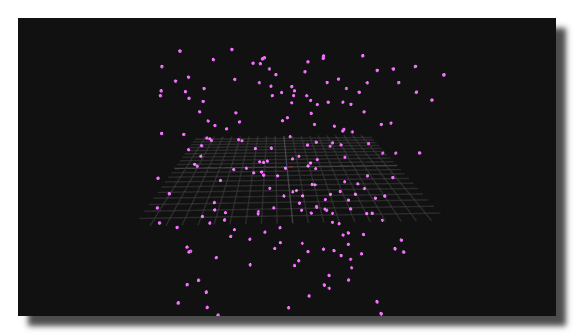
3D sphere with constant screen-size (billboard behavior). The sphere automatically scales based on camera distance so it always appears the same size on screen, regardless of zoom or camera position.
Uses direct GPU drawing for maximum performance: all sphere instances are rendered by a single scene-graph node, making it suitable for large numbers of spheres (point clouds, particle-like visualizations, etc.).
Settings
visible
Determines if the object is visible or not.
hit test
Determines if the 3D object interact with the mouse, for example to know which vertex is selected.
disable the hit test on heavy meshes to improve display smoothness.
viewport num
ID number of the target object3d-viewer where the object is displayed.
opacity
Opacity of the object or primitive.
color
Color of the primitives.
vertices points
3D points coordinates used to draw the primitives.
- 1 point for (3 coordinates) for points,
- 2 points (6 coordinates) for lines,
- 3 points (9 coordinates) for triangles.
coordinates
3D coordinates of the sphere centers. Provided as a flat array of XYZ triplets: every 3 values define one sphere position. The number of spheres is determined by the array length divided by 3.
screen size
Controls the apparent size of the spheres on screen. The sphere scales proportionally to its distance from the camera, so this value defines a relative angular size rather than a world-space dimension. Accepts a single value (applied to all instances) or an array of values (one per sphere).
subdivisions axes
Number of subdivisions used to generate the sphere mesh. Higher values produce a smoother sphere but require more processing. All instances share the same subdivision level.
Common Settings
info
show manual
Button. Opens the manual page of the selected object (or of its parent module for a control) in the web browser. If no page exists for this object, an error is traced in the trace panel.
For more details about information/help creation, see create-help-file.
description
Free multi-line text attached to the module, saved with the patch. It is only meant as an internal note for the patch designer: it is not displayed in the interface.
ID's
visible only in god mode, see setup-panel-tab-expert.
unique ID
Read-only, not saved. Current private numeric ID of the object, used internally to identify it (for example as the target of a bind ID).
preset ID
Read-only, not saved. Private ID used to store and recall the values of this control in presets.
recreate ID
Button. Generates a new unique ID, original ID and preset ID for the object. Use it if you experience difficulties in Polyphonic mode or if two objects share the same ID. Preset values and binds referring to the old IDs are lost.
Object Remote Address
absolute
Read-only, not saved. Absolute address of the object in the Usine objects tree, built from the workspace root. This is the address to use to reach the object from scripts, the objects panel or remote messages. Only shown for objects that are registered in the objects list. See objects-address.
local
Read-only, not saved. Address of the object relative to the current patch, valid inside that patch only. See objects-address.
user addr
Free user-defined address for the object (empty by default). When set, the object is also registered in the objects tree under this name, so it can be reached independently of its position in the workspace (the value is also reported in the mouse-over and mouse-down chunks). Changing it rebuilds the objects list. Only available on objects that support a user address. See objects-address.
See also
- Object 3D
- Object3D Mesh
- Object3D Primitive Lines
- Object3D Sphere
- Object3D Primitive Points
- Object3D Cone
- Object3D Stroke Cube
- Object3D Billboard Sphere
- Object3D Ellipse
- Object3D Cylinder
- Object3D Round Cube
- Object3D Plane
- Object3D Disk
- Object3D Path
- Object3D Model
- Object3D Text
- Object3D Primitive Quads
- Object3D Rectangle
- Object3D Primitive Triangle
- Object3D Cube
version 7.0.250921
Edit All Pages