Object3D Cylinder
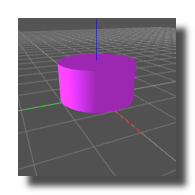
3D cylinder object.
Settings
visible
Determines if the object is visible or not.
hit test
Determines if the 3D object interact with the mouse, for example to know which vertex is selected.
disable the hit test on heavy meshes to improve display smoothness.
viewport num
ID number of the target object3d-viewer where the object is displayed.
opacity
Opacity of the object or primitive.
3D pos
XYZ position of the object.
3D rotation
XYZ rotation angles of the object.
3D size
Size of the object along the X, Y, and Z axes.
color diffuse
The base visible color of the material when light shines on it. Simulates light scattered equally in all directions after hitting the surface. Gives the object its general “matte” color.
Example: A red ball has a red diffuse color, so under white light it looks red.
color ambient
The color the object reflects under indirect light (light that is everywhere in the scene, not coming from a specific direction). It represents background/global illumination that lights up surfaces even if they’re not directly lit. Prevents completely black shadows and keeps objects visible in the dark.
Example: In a dim room with no direct lamp, a red ball still looks faintly red because of ambient color.
color specular
The color of the shiny highlights when light reflects off the surface. Simulates mirror-like reflection of light sources. Depends on camera position. Controls the “shininess” or glossiness of the material.
Example: A polished red ball has a bright white highlight (specular = white). A metallic red ball might reflect red highlights (specular = red).
color emissive
The color the object appears to emit on its own, as if glowing. Independent of lighting — it adds brightness directly to the object’s surface. Makes objects look like they generate light (though they don’t actually light up other objects unless you use advanced shaders).
Example: A computer screen in a dark room has emissive colors (the pixels glow by themselves).
color mode
Determines if the object is drawn with a solid color (without any lighting effects) or with the combination of color diffuse, color ambient, color specular, and color emissive.
For the plain color, only the color diffuse is used.
texture
Texture of the object — an image applied to its surfaces.
subdivisions axes
Number of subdivisions used to generate the mesh. Higher values produce a smoother surface but require more processing.
Common Settings
info
show manual
Button. Opens the manual page of the selected object (or of its parent module for a control) in the web browser. If no page exists for this object, an error is traced in the trace panel.
For more details about information/help creation, see create-help-file.
description
Free multi-line text attached to the module, saved with the patch. It is only meant as an internal note for the patch designer: it is not displayed in the interface.
ID's
visible only in god mode, see setup-panel-tab-expert.
unique ID
Read-only, not saved. Current private numeric ID of the object, used internally to identify it (for example as the target of a bind ID).
preset ID
Read-only, not saved. Private ID used to store and recall the values of this control in presets.
recreate ID
Button. Generates a new unique ID, original ID and preset ID for the object. Use it if you experience difficulties in Polyphonic mode or if two objects share the same ID. Preset values and binds referring to the old IDs are lost.
Object Remote Address
absolute
Read-only, not saved. Absolute address of the object in the Usine objects tree, built from the workspace root. This is the address to use to reach the object from scripts, the objects panel or remote messages. Only shown for objects that are registered in the objects list. See objects-address.
local
Read-only, not saved. Address of the object relative to the current patch, valid inside that patch only. See objects-address.
user addr
Free user-defined address for the object (empty by default). When set, the object is also registered in the objects tree under this name, so it can be reached independently of its position in the workspace (the value is also reported in the mouse-over and mouse-down chunks). Changing it rebuilds the objects list. Only available on objects that support a user address. See objects-address.
See also
- Object 3D
- Object3D Mesh
- Object3D Primitive Lines
- Object3D Sphere
- Object3D Primitive Points
- Object3D Cone
- Object3D Stroke Cube
- Object3D Billboard Sphere
- Object3D Ellipse
- Object3D Cylinder
- Object3D Round Cube
- Object3D Plane
- Object3D Disk
- Object3D Path
- Object3D Model
- Object3D Text
- Object3D Primitive Quads
- Object3D Rectangle
- Object3D Primitive Triangle
- Object3D Cube
version 7.0.250921
Edit All Pages