SURR Delay 8
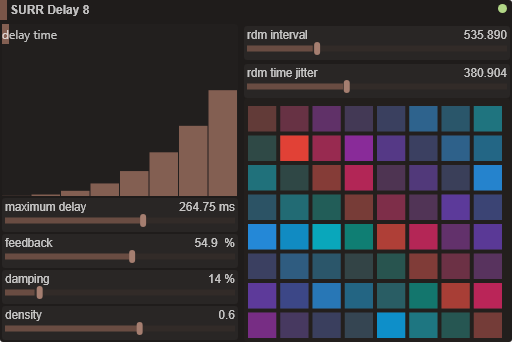
Multichannel echo for 8 speakers: 8 delay lines spread their echoes over the speakers through a mixing matrix that changes at random over time.
The audio inputs 1-2 are mixed to mono and feed 8 delay lines (one audio-delay each), whose delay times go from 0 to maximum delay. An audio-mix-matrix sends each delay line to the speakers: new random cells open at regular intervals and fade in. The audio outputs 1-8 feed 8 speakers, in any order since the matrix is random. With nb audio out in the settings window, the patch uses fewer delays and speakers.
Play short sounds and raise feedback.
In the library: 1-Audio > Audio Surround.
Settings
delay time
Display of the 8 delay times, in ms, from 0 to maximum delay. Their spread is set by delay time shape in the settings window.
maximum delay
Longest delay time, from 0 to 2000 ms.
feedback
Amount of the echoes sent back into the delay lines, from 0 to 99 %: the higher, the more repeats.
damping
High cut filter in the delay lines, from 0 to 99 %: the higher the value, the more the high frequencies of the repeats are absorbed, for a softer, more analog echo.
density
Density of the matrix, from 0 to 1: the higher, the more cells open, so each delay line reaches more speakers.
rdm interval
Time between two random changes of the matrix, from 10 to 2000 ms.
rdm time jitter
Random extra time added to rdm interval at each change, up to this value, from 0 to 1000 ms.
matrix
The mixing matrix. Each cell sends a delay line (in N) to a speaker (out N); the cells change at random.
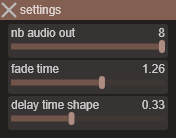
Settings window
advanced settings
 Use this icon in the patch header to open these advanced settings. Like the other icons of the header, it shows when the mouse is over the control panel of the patch (the green dot, always shown, turns the patch ON or OFF).
nb audio out
Number of delay lines and speakers used, from 1 to 8.
fade time
Fade time of the matrix cells when they change, from 0.01 to 10.
delay time shape
Shape of the spread of the 8 delay times between 0 and maximum delay, from 0.1 to 10. The delay time display shows the result.
See also
version 7.0.250921
Edit All Pages