SURR Kinetic Player
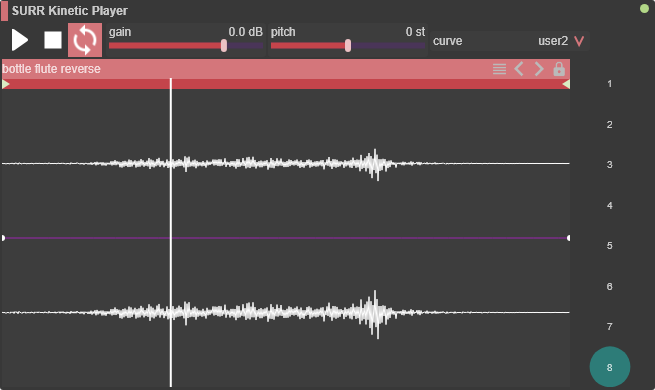
Kinetic surround player: a curve drawn on the waveform of a sample moves the sound along a line of 2 to 8 speakers while it plays.
The audio-sampler plays the file (left channel). Its user curve 1 sets the position of the source in an audio-pan-surround-panner whose speakers stand in one column: the top of the curve is speaker 1, the bottom of the curve the last speaker. The audio outputs 1-8 go from speaker 1 (top of the panner) to speaker 8: place the speakers in a row or around the room. It needs 8 speakers, or fewer with num of speakers in the settings window.
Press play, set curve to surround pan and draw a ramp on the waveform.
In the library: 1-Audio > Audio Surround.
Settings
play
The play icon: plays the file. What a second click does is set by play button mode in the settings window.
stop
The stop icon: stops the file.
play loop
The loop icon: ON, the file plays in a loop until you stop it (see loop mode in the settings window).
gain
Volume of the file, from -80 to 12 dB.
pitch
Transposition of the file, from -48 to 48 halftones (st).
curve
Curve shown on the waveform, where you draw it with the mouse:
- all invisible: no curve.
- volume: the volume curve of the sampler.
- pitch: the pitch curve of the sampler.
- surround pan: the user curve 1, which moves the sound between the speakers.
- user2: the user curve 2 of the sampler.
sampler
Waveform of the file, with the curve chosen in curve drawn over it. Drop an audio file on it to load it.
panner
The narrow display at the right of the waveform: the surround panner, whose speakers stand in one column, speaker 1 at the top. It shows the position of the source set by the curve.
Settings window
advanced settings
 Use this icon in the patch header to open these advanced settings. Like the other icons of the header, it shows when the mouse is over the control panel of the patch (the green dot, always shown, turns the patch ON or OFF).
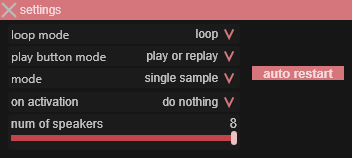
loop mode
How the file repeats when play loop is ON:
- loop: the file plays in a loop.
- cycle, bar, beat, 8th, 16th: the file restarts at each cycle, bar, beat, 8th note or 16th note of the tempo.
- 2 bars to 16 bars: the file restarts every 2, 4, 6, 8, 10, 12, 14 or 16 bars.
- loop on bar: the file plays to its end, then restarts at the beginning of the next bar.
- loop on beat: the file plays to its end, then restarts at the beginning of the next beat.
play button mode
- play or replay: the first click plays the file once, a second click restarts it.
- play or stop: the first click plays the file once, a second click stops it.
mode
How the files of the sampler list are read:
- single sample: only the selected file.
- next: at the end of the file, the next file of the list is selected.
- prev: at the end of the file, the previous file of the list is selected.
- random: at the end of the file, a random file of the list is selected.
on activation
What happens when the patch is activated:
- do nothing
- play once: the file plays once.
num of speakers
Number of speakers of the panner, from 2 to 8.
auto restart
ON: the file restarts from the beginning on play or when the patch is activated.
See also
version 7.0.250921
Edit All Pages