Network OSC Receive
Gets OSC message values.
Usine can receive and send OSC messages from/to the network.
This allows communication between all the computers connected to the network or on Internet.
what is an OSC message?
An OSC message contains 3 parts.
- the OSC address, is a string which represents the name of the data.
Generally addresses are between
/. For example/usine/frequency,/filter/frequency1/,/data/random/value/. - the tag is comma (
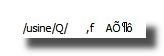
,) followed by a set of characters which represents the type of the data's. For example,f,,b. As an OSC message can contain several data's at the same time the tag can be,ffffor 3 float,,iibfor 2 integers and an array. - the data's which are binary bytes generally totally unreadable except for *Rain Man...
For example an OSC message can look like:
Settings
address
Osc address string of the message.
Be careful, the OSC address string is key sensitive.
It mean that /USINE/ is not equal to /usine/.
receive
Sends 1 value when a new data is received.
data
Received data fields.
data array
Contains all incoming values packed as an array. All data outlets are concatenated.
data array combined
Contains all incoming values packed as a combined array. data1,data2..dataN, data1,data2..dataN,...
port filter
Input port number of incoming messages to filter.
Set 0 for no filter, and let passes all incoming messages.
ip filter
Filter apply: receives only data's from the specified IP.
Use 0.0.0.0 for no filter.
add pass if changed at the output
When ON, this module has a pass-if-changed behavior, which means that the output is set only if the value has changed.
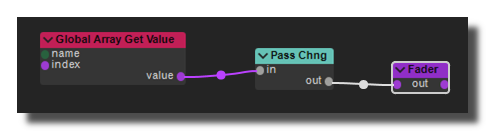 this option is equivalent to this patch
Common Settings
info
show manual
Button. Opens the manual page of the selected object (or of its parent module for a control) in the web browser. If no page exists for this object, an error is traced in the trace panel.
For more details about information/help creation, see create-help-file.
description
Free multi-line text attached to the module, saved with the patch. It is only meant as an internal note for the patch designer: it is not displayed in the interface.
ID's
visible only in god mode, see setup-panel-tab-expert.
unique ID
Read-only, not saved. Current private numeric ID of the object, used internally to identify it (for example as the target of a bind ID).
preset ID
Read-only, not saved. Private ID used to store and recall the values of this control in presets.
recreate ID
Button. Generates a new unique ID, original ID and preset ID for the object. Use it if you experience difficulties in Polyphonic mode or if two objects share the same ID. Preset values and binds referring to the old IDs are lost.
Object Remote Address
absolute
Read-only, not saved. Absolute address of the object in the Usine objects tree, built from the workspace root. This is the address to use to reach the object from scripts, the objects panel or remote messages. Only shown for objects that are registered in the objects list. See objects-address.
local
Read-only, not saved. Address of the object relative to the current patch, valid inside that patch only. See objects-address.
user addr
Free user-defined address for the object (empty by default). When set, the object is also registered in the objects tree under this name, so it can be reached independently of its position in the workspace (the value is also reported in the mouse-over and mouse-down chunks). Changing it rebuilds the objects list. Only available on objects that support a user address. See objects-address.
See also
- Create OSC Translator File
- Setup onglet Réseau
- Tutoriel : OSC (Open-Sound-Control)
- Panel Embedded Web Page
- Network
- Network Modbus Client Read
- Network Send Bytes
- MDNS Service
- Network Get File
- Network Get Adapter Info
- Network FTP Put File
- Network MQTT Client
- Network Markdown to HTML
- MDNS Lister
- Network OSC Send
- Network OSC Receive
- Network KNX Connection
- Network PosiStageNet
- Network Web Browser
- Network Set IP Address
- Network Modbus Server
- Network TCP Client
- Network TUIO Receive
- Network KNX Group Receive
- Network OSC Lister
- Network Modbus Client Write
- Network TCP Server
- Network Web Socket
- Network KNX Group Send
- Network PJLink Projector
- Network RTTrPM
- Network Receive Bytes
- Network OSC Send String
version 7.0.250921
Edit All Pages