SYNTH MatryX
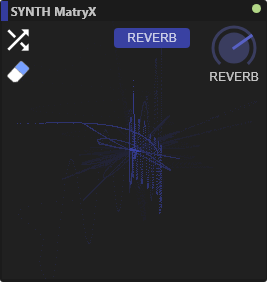
Synthesizer driven by a matrix. Its sound is set in the settings window: a matrix crosses the parameters of the oscillator, the LFO, the filter and the sequence (lines) with three sources, LFO, OSC and STEP (columns), and a row of steps runs below it. The panel holds the randomize and reset icons, a reverb and an XY oscilloscope that draws the output.
In the library: 1-Audio > Audio Synthesis.
Settings
randomize
The shuffle icon: draws new random settings.
reset
The eraser icon: resets the settings.
REVERB
The knob sets the level of the reverb, from -80 to 12 dB. The REVERB switch next to it turns the reverb ON or OFF.
Oscilloscope XY
The dark area of the panel: draws the audio output as an XY figure.
Settings window
advanced settings
 Use this icon in the patch header to open these advanced settings. Like the other icons of the header, it shows when the mouse is over the control panel of the patch (the green dot, always shown, turns the patch ON or OFF).
matrix
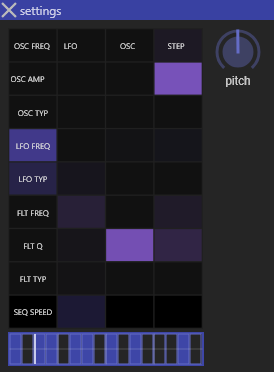
The grid of the window. Its lines are the parameters OSC FREQ, OSC AMP, OSC TYP (oscillator frequency, amplitude and type), LFO FREQ, LFO TYP (LFO frequency and type), FLT FREQ, FLT Q, FLT TYP (filter frequency, resonance and type) and SEQ SPEED (speed of the sequence). Its columns are the sources LFO, OSC and STEP. The color of a cell shows its value.
pitch
The knob at the right of the matrix: pitch of the synthesizer, from 0.01 to 2.
steps
The row of steps at the bottom of the window, with its cursor.
See also
version 7.0.250921
Edit All Pages