ABRAIN Harmonic Delays
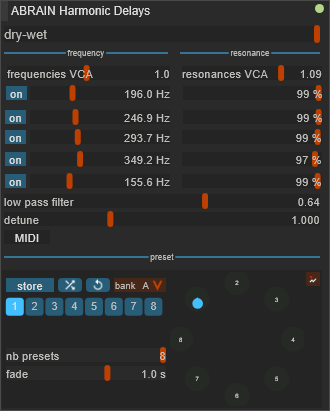
Five tuned resonators made of delays with a high feedback (comb filters), each one ringing at the frequency of its row. The frequencies are set by hand or by MIDI notes. Each resonator holds two audio-delay modules, one for the left channel and one for the right channel.
The input is lowered by 27 dB and sent to the resonators; they are summed and go through a limiter, and dry-wet mixes them with the dry sound. Inputs: audio in 1-2 and MIDI in. Outputs: audio out 1-2. Presets store the settings and can be morphed.
Play a drum loop, then move frequencies VCA and detune.
In the library: 1-Audio > Audio Brain.
Settings
dry-wet
Amount of the original signal and processed signal.
- 0: dry only
- 1: wet only.
frequencies VCA
Scales the frequencies of all the rows, from 0.1 to 2.
resonances VCA
Scales the resonances of all the rows, from 0.8 to 1.2.
on
There are five rows, one per resonator. The switch at the start of a row turns its resonator ON or OFF (caption off).
frequency
The first fader of each row, below the frequency header: frequency of the resonator, from 45 to 20000 Hz.
resonance
The second fader of each row, below the resonance header: resonance of the resonator, from 0 to 100 %.
low pass filter
From 0 to 0.999: the higher, the brighter the sound.
detune
Moves the frequencies of the right side apart from the left side, from 0.5 to 2.
MIDI
ON: each MIDI note received tunes one row, and these controls appear:
- attack: from 0 to 1000 ms.
- release: from 0 to 10000 ms.
Presets
The preset zone stores the settings of the patch in slots and morphs between them.
store
ON: a click on a slot stores the current settings in it. OFF: a click on a slot recalls it.
random
The shuffle icon: gives random values to all the parameters of the patch.
reset
The circular arrow icon: sets all the parameters of the patch back to their default values.
bank
Bank of presets: A, B, C or D. Each bank has its own slots.
1 to 8
The preset slots. A click recalls the preset of the slot in fade seconds; with store ON, a click stores the current settings in the slot.
morphing surface
The numbered circles on the right are the presets. Drag the cursor between the circles to morph the presets: the closer the cursor is to a circle, the more its preset counts.
nb presets
Number of presets (circles) on the morphing surface, from 2 to 8.
fade
Time taken to reach a recalled preset, from 0 to 6 s.
automation
The small icon at the top right of the preset zone. ON: a trajectory and its controls appear, to move the cursor of the morphing surface automatically:
- trajectory: path of the cursor; double-click to add or delete a point of the path.
- play automation: moves the cursor along the trajectory.
- time: duration of the movement, from 0 to 60 s.
- loop: ON, the movement starts again at the end.
- reset: resets the trajectory.
See also
version 7.0.250921
Edit All Pages