ABRAIN Bit Cloud
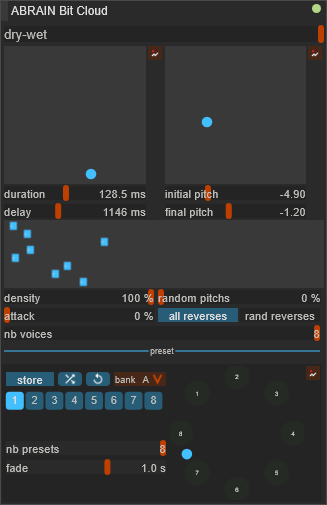
Granular delay: up to 8 voices keep recording the input, and each one replays short fragments of it, taken at a random point up to delay ms back, with a pitch glide and an envelope. The voices are built on the audio-sampler-recorder module.
The audio inputs 1-2 are mixed and sent to the voices, which are spread from left to right. They go through a limiter, and dry-wet mixes the dry sound and the cloud to the audio outputs 1-2. Two XY pads set the time and the pitch of the fragments, and presets store the settings and can be morphed.
Play a sound, set duration to 100 ms and move the right XY pad.
In the library: 1-Audio > Audio Brain.
Settings
dry-wet
Amount of the original signal and processed signal.
- 0: dry only
- 1: wet only.
left XY pad
X sets delay, Y sets duration.
right XY pad
X sets initial pitch, Y sets final pitch.
automation
The small icon at the top of the XY pads; each pad has its own automation switch. ON: a trajectory and its controls appear, to move the point of the pad automatically:
- trajectory: path of the point; double-click to add or delete a point of the path.
- play automation: moves the point along the trajectory.
- time: duration of the movement, from 0 to 60 s.
- loop: ON, the movement starts again at the end.
- reset: resets the trajectory.
duration
Length of the fragments, from about 23 ms to 3000 ms.
initial pitch
Pitch at the start of each fragment, in semitones, from -12 to 12. The pitch glides from initial pitch to final pitch during the fragment. See also pitch ambitus in the settings window.
delay
How far back the fragments can start, from 0 to 3045 ms: each fragment starts at a random point between now and delay ms back.
final pitch
Pitch at the end of each fragment, in semitones, from -12 to 12.
voices display
The area below the XY pads draws the voices as squares while they play.
density
Chance that a fragment is played, from 0 to 100 %.
random pitchs
Amount of random pitch given to the fragments, from 0 to 100 %.
attack
Fade in and fade out of each fragment, from 0 to 100 %.
all reverses
ON: every fragment plays backward.
rand reverses
ON: fragments chosen at random play backward. all reverses and rand reverses cannot be ON at the same time.
nb voices
Number of voices, from 1 to 8.
Presets
The preset zone stores the settings of the patch in slots and morphs between them.
store
ON: a click on a slot stores the current settings in it. OFF: a click on a slot recalls it.
random
The shuffle icon: gives random values to all the parameters of the patch.
reset
The circular arrow icon: sets all the parameters of the patch back to their default values.
bank
Bank of presets: A, B, C or D. Each bank has its own slots.
1 to 8
The preset slots. A click recalls the preset of the slot in fade seconds; with store ON, a click stores the current settings in the slot.
morphing surface
The numbered circles on the right are the presets. Drag the cursor between the circles to morph the presets: the closer the cursor is to a circle, the more its preset counts.
nb presets
Number of presets (circles) on the morphing surface, from 2 to 8.
fade
Time taken to reach a recalled preset, from 0 to 6 s.
automation
The small icon at the top right of the preset zone. ON: a trajectory and its controls appear, to move the cursor of the morphing surface automatically:
- trajectory: path of the cursor; double-click to add or delete a point of the path.
- play automation: moves the cursor along the trajectory.
- time: duration of the movement, from 0 to 60 s.
- loop: ON, the movement starts again at the end.
- reset: resets the trajectory.
Settings window
advanced settings
 Use this icon in the patch header to open these advanced settings. Like the other icons of the header, it shows when the mouse is over the control panel of the patch (the green dot, always shown, turns the patch ON or OFF).

pitch ambitus
Range of the pitches:
- -/+ 6
- -/+ 12
- -/+ 24
- -/+ 36
continuous pitch
ON: the pitches take any value. OFF (caption discret pitch): the pitches are rounded to whole semitones.
See also
version 7.0.250921
Edit All Pages