Multi Knob (SUB-PATCH)
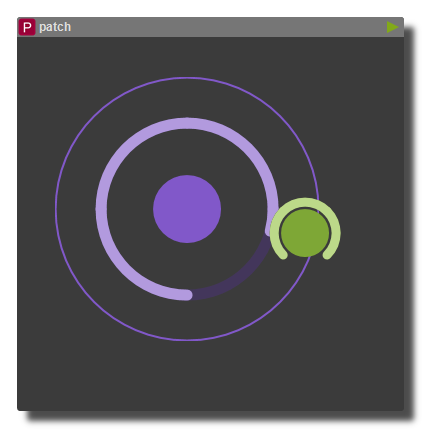
Round control to modify 9 parameters at once with a single interface element. It is made of an inner ring knob (knob int) around a disc, and a small outer knob (knob ext) placed on a circle around it. Its 9 outlets send the values of the inner part (int) and of the outer part (ext), the state of the mouse button and a radius.
Its controls are grouped in a panel-container shown by default on the control panel of the parent patch; where moves it to another place. Connect the outlets to the parameters to control.
In the browser: tab modules, All Modules > Interface Design > Multi Knob.
Settings
where
Where the multi knob is displayed:
- invisible
- control panel
- parent control panel
- top parent control panel
- container
- parent container
- top parent container
- popup window
- top header
- toolbox
- interface builder
- workspace
- current rack
color
Color of the multi knob.
X int
X value of the inner part of the multi knob.
Y int
Y value of the inner part of the multi knob.
mouse dwn
State of the mouse button on the multi knob: 1 while it is pressed.
knob int
Value of the inner ring knob, from 0 to 1.
X ext
X value of the outer part of the multi knob.
Y ext
Y value of the outer part of the multi knob.
mouse dwn int
State of the mouse button on the multi knob: 1 while it is pressed.
knob ext
Value of the outer knob, from 0 to 1.
radius
Radius computed by the multi knob, as a distance from its center.
Panel
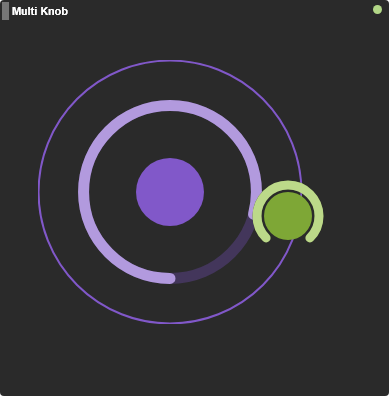
The panel shows the inner ring knob (knob int) with the disc at its center, and the small outer knob (knob ext) on the circle around it. Their values are sent to the outlets described above.
See also
- Data Manipulation Calc Min (SUB-PATCH)
- Multi Knob (SUB-PATCH)
- MIDI Send All Notes OFF (SUB-PATCH)
- Data Manipulation Hysteresis (SUB-PATCH)
- Light MIDI to Dimmer (SUB-PATCH)
- Empty Sub-Patch (SUB-PATCH)
- Phase Voc Forward (SUB-PATCH)
- Audio Analysis Beat Follower Threshold (SUB-PATCH)
- Data Generator Random Integer (SUB-PATCH)
- MIDI Delay Feedback Pitch (SUB-PATCH)
- Audio Analysis Beat Follower (SUB-PATCH)
- Generalized VBAP 2D (SUB-PATCH)
- MIDI Freez (SUB-PATCH)
- Color Spectrum (SUB-PATCH)
- Data Manipulation Rec XY (SUB-PATCH)
- Phase Voc Inverse (SUB-PATCH)
- Data Manipulation Local Max (SUB-PATCH)
- Data Manipulation Calc Max (SUB-PATCH)
- Data Manipulation Local Min (SUB-PATCH)
- Data Generator Random Law (SUB-PATCH)
- Créer des Sub-Patches
version 7.0.250921
Edit All Pages