Video Shaders Draw
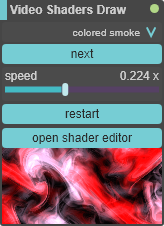
Video generator: plays OpenGL shaders that draw an image, chosen in a list, with speed and restart controls. The patch has no video input: the shader makes the image.
A file-lister lists the shaders of the folder Resources/Medias/Shaders/draw, and the selected one is played by the video-opengl-shader module. Its image goes to the next patch of the rack (or the rack output).
Press next and watch the image under the controls.
In the library: 3-Video.
Settings
shader
The list at the top of the panel: chooses the shader played among the 80 files of the draw folder (aliased rain, colored smoke, hypnotic spirals, magma, rotating cube...).
next
Selects the next shader of the list.
speed
Speed of the animation, from 0 to 10 (logarithmic fader): 1 is the normal speed, 0 stops it.
restart
Starts the shader again from its beginning.
open shader editor
Shows the code of the shader, to change it.
video out
The image made by the shader, shown under the controls.
See also
version 7.0.250921
Edit All Pages