SAMPL Audio File Joggle Player
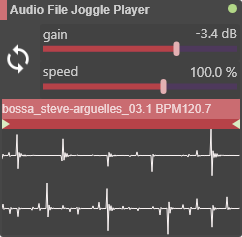
Audio file player with joggle control: plays an audio file in a loop at a variable speed, forward or backward, like a turntable (joggle or scratch). One speed fader sets the speed, the pitch and the direction of the audio-sampler: 12 semitones per octave, and below 0 the sampler plays backward.
Audio in 1-2, mixed to the output at audio thru (settings window). Audio out 1-2.
Move speed slowly from 100 to -100 % and listen.
In the library: 1-Audio > Audio Sampling.
Settings
on
The loop icon: plays the file in a loop.
gain
Output volume, from -80 to 12 dB.
speed
Playback speed, from -400 to 400 %. The pitch changes with the speed:
- 100 %: normal speed.
- 50 %: half speed, one octave down.
- 0 %: stopped.
- negative values: the file plays backward.
sampler
The waveform of the audio file, with its name above it. Drop another audio file on it to play it.
Settings window
advanced settings
 Use this icon in the patch header to open these advanced settings. Like the other icons of the header, it shows when the mouse is over the control panel of the patch (the green dot, always shown, turns the patch ON or OFF).
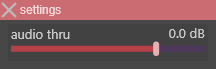
audio thru
Level of the audio input mixed to the output, from -80 to 12 dB.
See also
version 7.0.250921
Edit All Pages