REVERB Convolution
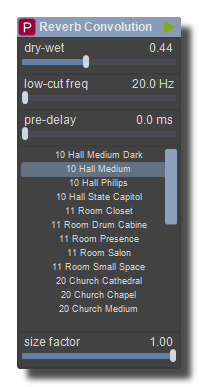
Convolution reverb: the sound is played through a real room, hall or church, recorded as an impulse response (an audio file). Choose the impulse in the list of the control panel.
The audio inputs 1-2 go into a reverb convolver, then to the audio outputs 1-2. The list shows the audio files of the folder Resources/Medias/Audio/Reverb Impulses, read with the file-lister module.
Play a short sound and compare a Room and a Church impulse.
In the library: 1-Audio > Audio FX > Reverb.
Settings
dry-wet
Balance between the dry sound and the reverb, from 0 (dry sound only) to 1 (reverb only).
low-cut freq
Removes the bass from the reverb, from 20 to 1000 Hz.
pre-delay
Silence before the reverb, from 0 to 200 ms.
impulse
The list of the impulse files: click a file to play the sound through it. The files of Usine are sorted by kind:
- 10 Hall: Medium Dark, Medium, Philips, State Capitol
- 11 Room: Closet, Drum Cabine, Presence, Salon, Small Space
- 20 Church: Cathedral, Chapel, Medium
- 21: Outdoor Late, Parking, Silo, Stadium
- 30 Plate: 01, 02, 03
- 31: Diffuse Clear, Diffuse Dark, Spring Reverb
- 40 Sound Design: Creepy Bright, Creepy Dark, Horn, Piano
- 41 Car: Small, Van Front, Van Rear
- 42 Space Echo: A, B
size factor
Shortens the impulse, from 0 to 1.
Settings window
advanced settings
 Use this icon in the patch header to open these advanced settings. Like the other icons of the header, it shows when the mouse is over the control panel of the patch (the green dot, always shown, turns the patch ON or OFF).
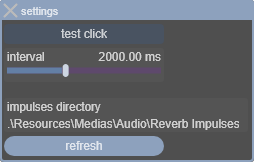
test click
ON: plays test clicks through the reverb, one every interval.
interval
Time between two test clicks, from 0 to 100000 ms.
impulses directory
Folder of the impulse files shown in the list. By default: .\Resources\Medias\Audio\Reverb Impulses.
refresh
Reads the folder again and updates the list.
See also
version 7.0.250921
Edit All Pages