PAN Doppler
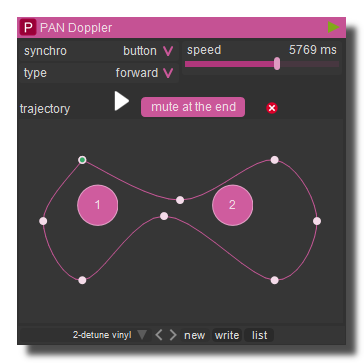
Moves a mono sound along a drawn path between two speakers: its level, brightness and pitch change with the distance (Doppler effect), like a car passing by.
The audio input 1 goes, for each speaker, through a delay (audio-delay), a low pass filter (audio-filter-simple) and a volume, then through an audio-mix-volume module to the audio outputs 1-2.
Play a sound, set synchro to loop and speed to 2000 ms.
In the library: 1-Audio > Audio FX > Panoramic.
Settings
synchro
What starts and paces the movement along the path:
- button: one pass each time you press start.
- loop: the movement repeats, one pass lasting speed.
- cycle
- bar
- beat
type
Direction of the movement along the path:
- forward
- backward
- forward-backward
speed
Duration of one pass along the path, from 0 to 40000 ms. Shown when synchro is button or loop.
start
Starts one pass along the path. Shown when synchro is button.
mute at the end
ON: the output is muted 500 ms after the movement stops, until the next start. Shown when synchro is button.
trajectory
Path of the sound: drag its points to draw it. The circles 1 and 2 are the two speakers; their spacing follows speakers pos in the settings window.
clear
The red X: clears the path.
Settings window
advanced settings
 Use this icon in the patch header to open these advanced settings. Like the other icons of the header, it shows when the mouse is over the control panel of the patch (the green dot, always shown, turns the patch ON or OFF).
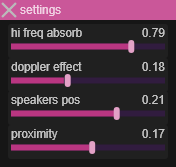
hi freq absorb
Absorption of the high frequencies with the distance, from 0 to 1: the farther the sound, the darker.
doppler effect
Amount of the Doppler effect, from 0 to 0.5: high values give large pitch changes.
speakers pos
Distance between the speakers, from 0 to 0.3.
proximity
How much the volume drops with the distance from each speaker, from 0.01 to 2. With low values the volume hardly depends on the distance. You can also see it as the overall size of the scene.
See also
version 7.0.250921
Edit All Pages