MOGGER Super Delay
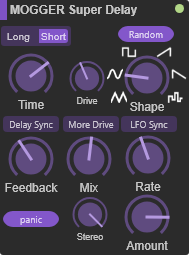
Analog delay in the style of a Moogerfooger: after a drive and a low pass filter, each side is delayed with feedback, and an LFO with six shapes moves the delay time (chorus, wobble). The delay time and the LFO can follow the tempo.
The audio inputs 1-2 go through an audio-disto-wave-shaper, an audio-filter-moog and two audio-delay, then a crossfade mixes the dry sound and the echoes to the audio outputs 1-2.
Play a guitar or a drum loop, then raise Amount.
In the library: 1-Audio > Audio FX > Mogger.
Settings
Long / Short
Range of the delay time and color of the echoes: Short from 40 to 600 ms, brighter (low pass at 5 kHz); Long from 80 to 1200 ms, darker (low pass at 2.7 kHz).
Random
Gives random values to the controls.
Time
Delay time: from 40 to 600 ms with Short, from 80 to 1200 ms with Long. Each range has its own knob, shown with its range.
Drive
Amount of distortion before the delay, from 0.99 to 100.
Shape
Shape of the LFO, from 1 to 6: Triangle, Sine, Square, Ramp, Sawtooth and Random. Click a shape icon around the knob to select it.
Delay Sync
ON: the delay time follows the tempo, set in the synchro list.
More Drive
Adds more distortion.
LFO Sync
ON: the speed of the LFO follows the tempo, set in the synchro list.
synchro
Note value of the tempo, shown when Delay Sync (delay time) or LFO Sync (LFO speed) is ON:
- 4beats
- 2beats
- beat
- 1/2beat
- triplet
- 1/4beat
- 24th
- 1/8beat
- 48th
- 1/16beat
- 1/32beat
Feedback
Amount of the echoes sent back into the delay, from 0 to 99.9 %: the higher, the more repeats.
Mix
Balance between the dry sound and the echoes, from 0 (dry only) to 1 (echoes only).
Rate
Speed of the LFO, from 0.05 to 50 Hz.
panic
Clears the echoes.
Stereo
Delays the right side and shifts its LFO, from 0 to 0.5.
Amount
Depth of the LFO on the delay time, from 0 to 10.
Settings window
advanced settings
 Use this icon in the patch header to open these advanced settings. Like the other icons of the header, it shows when the mouse is over the control panel of the patch (the green dot, always shown, turns the patch ON or OFF).
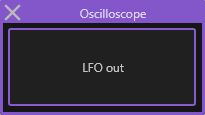
LFO out
View of the LFO over time.
See also
version 7.0.250921
Edit All Pages