MOD Stop
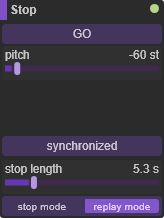
Turntable stop: press GO and the sound slows down to a halt, while its pitch falls to pitch, slowly at first, then faster. The duration of the slow down is set in seconds or follows the tempo.
The audio inputs 1-2 go into an audio-sampler-recorder module, which records and replays the input, then an audio-mix-crossfade sends the sound to the audio outputs 1-2.
Play a loop, press GO, then try stop length at 1 s.
In the library: 1-Audio > Audio FX > Modifier.
Settings
GO
Starts the slow down. The button shows stopping... while the sound slows down.
pitch
Pitch reached at the end of the slow down, from -64 to 0 st (semitones).
waveform
Shows the recorded sound.
synchronized
ON: the duration of the slow down follows the tempo (synchro). OFF: it is set by stop length.
synchro
Duration of the slow down as a note value of the tempo, shown when synchronized is ON:
- cycle
- bar
- 2 beats
- beat
stop length
Duration of the slow down, from 0.01 to 30 s, shown when synchronized is OFF.
stop mode / replay mode
What happens after the stop:
- stop mode: silence until the next GO.
- replay mode: the normal sound comes back.
See also
version 7.0.250921
Edit All Pages