Incrustation
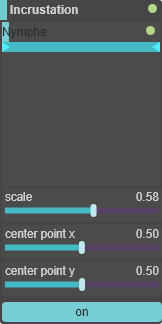
Picture in picture: draws the video of the player in the control panel (Nymphe.mp4) over the incoming video, scaled and placed. The inset replaces the pixels of the incoming video under it.
The video comes from the previous patch of the rack (or the rack input), goes into the video-mix-incrustation module with the video of a video-player module, and the result goes to the next patch of the rack (or the rack output).
In a rack, put it after the Video Player patch (3-Video), drop a video out device in the rack output, then move scale.
In the library: 3-Video > Video Mix.
Settings
video player
Panel of the video player that gives the inset video: it shows the name of the file played (Nymphe).
scale
Size of the inset, from 0 to 1: 1 is its own size in pixels.
center point x
Horizontal position of the center of the inset, from -1 to 2: 0.5 is the center of the frame.
center point y
Vertical position of the center of the inset, from -1 to 2: 0.5 is the center of the frame.
on
Turns the effect ON or OFF. OFF bypasses the effect: the video passes unchanged.
See also
version 7.0.250921
Edit All Pages