Video Geometric Resize
Changes the resolution of the video flow.
Can be useful to match the video resolution to the display screen
or to reduce the size and so the CPU load of all applied filters.
Settings
bypass
Bypasses the module processing when activated (ON).
- OFF (0): Module processes normally
- ON (1): Input passes directly to output without processing
video in
Video input flow(s).
video out
Video output flow(s).
process time
Total time used for the calculation of the module.
width
New width value.
height
New height value.
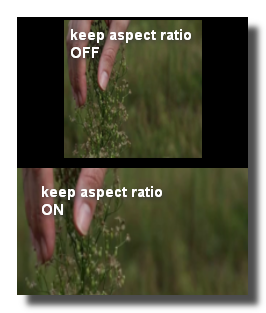
keep aspect ratio
When ON, the image is stretched to keep the aspect ratio of the original image.
Common Settings
info
show manual
Button. Opens the manual page of the selected object (or of its parent module for a control) in the web browser. If no page exists for this object, an error is traced in the trace panel.
For more details about information/help creation, see create-help-file.
description
Free multi-line text attached to the module, saved with the patch. It is only meant as an internal note for the patch designer: it is not displayed in the interface.
ID's
visible only in god mode, see setup-panel-tab-expert.
unique ID
Read-only, not saved. Current private numeric ID of the object, used internally to identify it (for example as the target of a bind ID).
preset ID
Read-only, not saved. Private ID used to store and recall the values of this control in presets.
recreate ID
Button. Generates a new unique ID, original ID and preset ID for the object. Use it if you experience difficulties in Polyphonic mode or if two objects share the same ID. Preset values and binds referring to the old IDs are lost.
Object Remote Address
absolute
Read-only, not saved. Absolute address of the object in the Usine objects tree, built from the workspace root. This is the address to use to reach the object from scripts, the objects panel or remote messages. Only shown for objects that are registered in the objects list. See objects-address.
local
Read-only, not saved. Address of the object relative to the current patch, valid inside that patch only. See objects-address.
user addr
Free user-defined address for the object (empty by default). When set, the object is also registered in the objects tree under this name, so it can be reached independently of its position in the workspace (the value is also reported in the mouse-over and mouse-down chunks). Changing it rebuilds the objects list. Only available on objects that support a user address. See objects-address.
See also
- Video Geometric Kaleidoscope
- Video Geometric Downsample
- Video Geometric Mirror Vertical
- Video Geometric Resize
- Video Geometric Bands
- Video Geometric Swirl
- Video Geometric Shuffle
- Video Geometric Flip Horizontal
- Video Displacement Map
- Video Geometric Mirror Horizontal
- Video Geometric Polar
- Video Geometric Get Size
- Video Geometric Oversample
- Video Geometric Change Aspect Ratio
- Video Geometric Pixels Distribution
- Video Geometric Fish Eye
- Video Geometric Bulge
- Video Geometric Ripple
- Video Geometric Flip Vertical
- Video Geometric Tile
version 7.0.250921
Edit All Pages