Procedure Suspend
Pause the execution of a procedure and resume it later. When suspended, the procedure's patch restarts its processing loop from the beginning on each cycle without advancing — effectively freezing execution in place until an end suspend trigger is received.
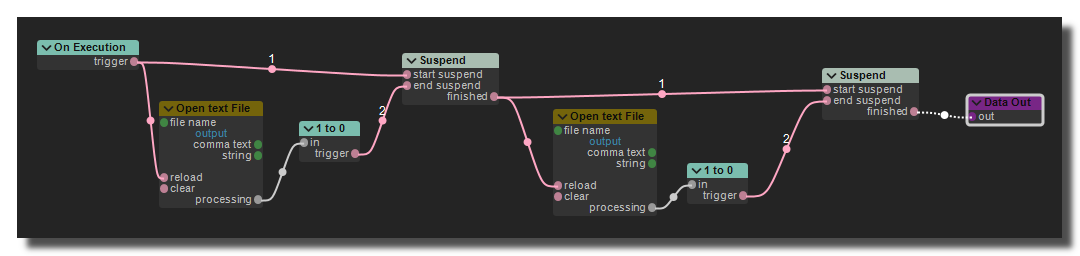
Example of a procedure using the suspend mechanism to wait for an external event before proceeding with its execution.
This module must be placed inside a procedure patch.
Settings
start suspend
Trigger input. When received, the procedure enters suspended state: the patch processing loop restarts from the top on every cycle without advancing past the suspend point. This allows the procedure to wait for an external event before continuing.
end suspend
Trigger input. When received, the procedure exits the suspended state and resumes normal execution.
finished
Outputs a trigger (1) at the moment the suspension ends — i.e., when end suspend is received while the procedure was actually suspended. Does not trigger if end suspend is received when the procedure was not suspended.
trace state
When enabled, logs the current suspend state to the trace-panel panel on every processing cycle. Useful for debugging, but should be disabled in production as it generates a large amount of trace output.
trace name
A custom label prepended to trace messages (e.g., myProc suspended = true). Helps identify which suspend module is logging when multiple procedures are used.
Common errors
Error: "the procedure-suspend module must be in a procedure" The Procedure Suspend module can only work inside a procedure patch. If placed in a regular patch, it has no effect and displays this error at creation. Move the module into a procedure's patch.
Warning: "the procedure-suspend module should be executed in thread mode"
The suspend mechanism only makes sense when the parent procedure-call is set to thread processing mode. In immediate mode, suspending will block the calling thread (typically the audio or main thread), causing audio glitches or UI freezes. Always set the procedure-call's processing mode to thread when using suspend.
No effect when start/end suspend are triggered on the same cycle
If both start suspend and end suspend receive a trigger simultaneously (same processing block), the procedure will be suspended and immediately un-suspended in the same cycle. The finished output will fire, but the suspension will have had no practical effect. Make sure the triggers are separated in time.
Forgetting to send end suspend
If start suspend is triggered but end suspend is never sent, the procedure remains suspended indefinitely — its patch loops forever without advancing. This can be mistaken for a crash or a hang. Always ensure there is a reliable path to trigger end suspend.
Common Settings
info
show manual
Button. Opens the manual page of the selected object (or of its parent module for a control) in the web browser. If no page exists for this object, an error is traced in the trace panel.
For more details about information/help creation, see create-help-file.
description
Free multi-line text attached to the module, saved with the patch. It is only meant as an internal note for the patch designer: it is not displayed in the interface.
ID's
visible only in god mode, see setup-panel-tab-expert.
unique ID
Read-only, not saved. Current private numeric ID of the object, used internally to identify it (for example as the target of a bind ID).
preset ID
Read-only, not saved. Private ID used to store and recall the values of this control in presets.
recreate ID
Button. Generates a new unique ID, original ID and preset ID for the object. Use it if you experience difficulties in Polyphonic mode or if two objects share the same ID. Preset values and binds referring to the old IDs are lost.
Object Remote Address
absolute
Read-only, not saved. Absolute address of the object in the Usine objects tree, built from the workspace root. This is the address to use to reach the object from scripts, the objects panel or remote messages. Only shown for objects that are registered in the objects list. See objects-address.
local
Read-only, not saved. Address of the object relative to the current patch, valid inside that patch only. See objects-address.
user addr
Free user-defined address for the object (empty by default). When set, the object is also registered in the objects tree under this name, so it can be reached independently of its position in the workspace (the value is also reported in the mouse-over and mouse-down chunks). Changing it rebuilds the objects list. Only available on objects that support a user address. See objects-address.
See also
version 7.0.250921
Edit All Pages