value
value settings
Settings related to the display and behavior of values.
value
show value
When ON, the current value of the control is always displayed on it; when OFF, it is hidden (it can still appear temporarily with show value on mouse over). Default ON on most faders and knobs.
 Option ON and OFF on a fader.
show value on mouse over
When ON, the value is displayed while the user interacts with the control: mouse over, mouse button down or mouse wheel in progress. Useful with show value OFF to get a clean control that shows its value only when needed. Default ON.
negative value by default
When ON, a number typed in the value editor without an explicit sign is taken as negative: typing 12 gives -12, while +12 gives 12 and -12 gives -12. Only available on numeric faders (not on text faders). Default OFF.
hint value on mouse down
When ON, a hint (tooltip) showing the value and its symbol is displayed next to the control while the mouse button is pressed on it or while the mouse wheel is turning. Default OFF.
display array values
When the value of the fader is an array, displays the whole array as a comma separated list (up to 32 elements) when ON, or only the first element when OFF. Default ON. Not available on text and color faders.
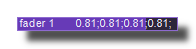
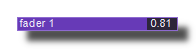 Option ON and OFF on a fader.
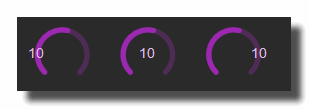 Example on a knob.
value font
Font used to display the value, chosen in the list of the fonts installed on the system.
value font bold
When ON, the value is displayed in bold.
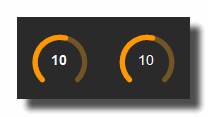 Example knob.
value font italic
When ON, the value is displayed in italic.
value font underline
When ON, the value is underlined.
value font color
Color of the value text (on color faders, the text color is automatically contrasted with the displayed color).
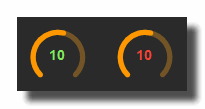 Example with a Green and a Red value on a knob.
value font size factor
Size of the value font, expressed as a factor of the control height (minus the borders): 0.5 gives a text half the height of the control. Range [0..3], default 0.9 (0.8 on knobs).
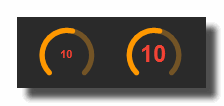 *Example with 2 different values on a knob.
value horizontal align
Horizontal alignment of the value text in the control:
- center: centered
- left: aligned to the left
- right: aligned to the right
value vertical align
Vertical alignment of the value text in the control:
- center: vertically centered
- top: aligned to the top
- bottom: aligned to the bottom
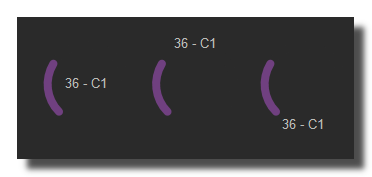 Example on knob (Center, top and bottom)
value editing mode
Determines how the value editor (keyboard entry of the value) is opened:
- on double click: a double click on the control opens the editor.
- on simple click: a simple click on the control opens the editor.
- disabled: the value cannot be edited with the keyboard (read only), except through the edit value button. Default on simple click on most faders.
show poly order
When ON, the voice number of the control (3 digits, starting at 001) is appended to its caption, for example "gain-002", when the sub-patch containing it is polyphonic with more than one voice. Only available on controls placed inside a sub-patch. Default ON.
symbol
show symbol
When ON, the symbol (unit) of the control, if not empty, is displayed after the value. Default ON. Not available on text faders.
 Option ON and OFF.
show symbol on mouse over
When ON, the symbol is displayed while the user interacts with the control (mouse over, mouse button down or mouse wheel), even if show symbol is OFF. Default ON. Not available on text faders.
 Example on a fader.
keyboard editing
tab order
Position of this fader in the keyboard navigation order of the patch. While editing a value with the keyboard, press TAB to validate it and jump to the fader with the next tab order, or SHIFT+TAB to jump to the previous one. After the last fader, the navigation wraps around to the first one. Faders located inside sub-patches are included in the navigation.
Faders with no tab order set are skipped. Orders do not need to be consecutive, only their relative position matters.
edit value
Opens the value editor of the fader, as if it had been double clicked, so the value can be typed with the keyboard. Useful to edit a value when the value editing mode is set to read only or when the fader is hidden behind other controls.
version 7.0.250921
Edit All Pages