listbox
display line number
Listbox only. When ON, each item is prefixed with its index in the list, starting at 0 (or at 1 when line number starts by 1 is ON). The number is only displayed, it is not part of the item's value.
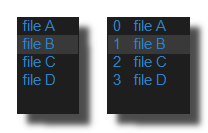 Example on a listbox.
hide filename ext
When ON, the extension of the items is not displayed (kick.wav is shown as kick). The values stored in the list keep their extension: this is a display option only. Also applies to the selected item and to the drop-down list of a combobox.
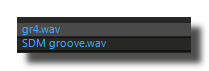 List with extension
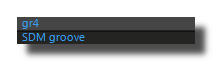 List without extension (option ON)
hide filename path
When ON, only the file name is displayed for items that are full paths (C:\samples\kick.wav is shown as kick.wav). The values stored in the list keep the full path: this is a display option only. Also applies to the selected item and to the drop-down list of a combobox.
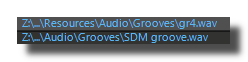 List with the full path
List without full path (option ON)
items size
Listbox only. Height of one item row in pixels, from 4 to 200 (default 14). The number of visible rows is the listbox height divided by this value, and the font size of the items is derived from it (see items font size factor). When items are images is ON, it is also the size of the thumbnails.
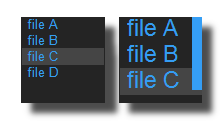 Example with 2 different item sizes.
Note that a scroller is added when the listbox can't display all items
and the option show scroller ON.
items font color
Color of the items text (the rows of a listbox, the selected item and the drop-down list of a combobox).
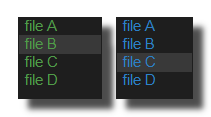 Example with 2 different items color.
show selection
When ON (default), the selected item is highlighted with a filled rectangle of the selection color. When OFF, no highlight is drawn. For a combobox, it applies to the drop-down list.
selection color
Color of the highlight drawn behind the selected item when show selection is ON.
items font size factor
Scale of the items font, from 0 to 3 (default 0.9). For a listbox, the font size is this factor multiplied by the items size. For a combobox, it is this factor multiplied by the control height, and the rows of the drop-down list are scaled by the same factor.
items font bold
When ON, the items text is drawn in bold.
items font italic
When ON, the items text is drawn in italic.
items font underline
When ON, the items text is underlined.
nb lines max displayed
Combobox only. Maximum number of items shown at once in the drop-down list, from 1 to 200 (default 10). When the list contains more items, the drop-down list gets a scroller (if show scroller is ON).
items are images
When ON, the items are treated as image file names: the image files are loaded, a listbox displays each item as a thumbnail (a square of the items size, centered in the row) instead of its text, and a combobox displays the selected image on the right of the control instead of its name. Items that are not valid image files are displayed empty.
items horizontal align
Combobox only. Horizontal alignment of the selected item text inside the combobox (default right):
- center: text centered
- left: text aligned on the left edge
- right: text aligned on the right edge, next to the drop-down arrow
items vertical align
Combobox only. Vertical alignment of the selected item text inside the combobox:
- center: text vertically centered
- top: text aligned on the top edge
- bottom: text aligned on the bottom edge
items align
Listbox only (saved as text align). Horizontal alignment of the items text in the rows (default left). Not used when items are images is ON.
- center: text centered in the row
- left: text aligned on the left edge
- right: text aligned on the right edge
scroller
scroller color
Color of the vertical scroller bar of a listbox and of the drop-down list of a combobox. The combobox arrow has its own drop-down arrow color.
show scroller
When ON (default), a vertical scroller is drawn on the right of the listbox (and of the drop-down list of a combobox) as soon as the list contains more items than the visible rows; the text area is reduced accordingly. When OFF, the scroller is never drawn.
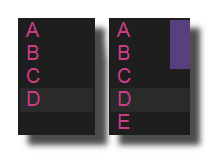 Option OFF and ON.
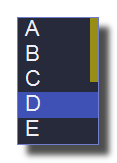 yellow scroller on a listbox.
scroller width factor
Width of the scroller bar as a factor, from 0 to 5 (default 0.8), of a 20 pixel base width: 1 gives a 20 pixel wide scroller, 0.4 an 8 pixel one.
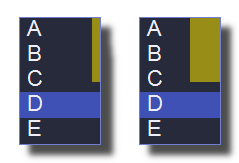 8 and 30 pixels scroller on a listbox.
combobox selector
show selector
Combobox only, displayed as show drop-down arrow in the settings. When ON (default), the drop-down triangle or arrow is drawn on the right of the combobox (only when the combobox is editable). When OFF, the arrow is hidden and the text uses the full width of the control.
selector width factor
Combobox only, displayed as drop-down arrow width in the settings. Size of the drop-down arrow as a factor, from 0 to 5 (default 0.4), of the combobox height, limited to the height minus the borders.
draw mode
Combobox only, displayed as drop-down arrow layout in the settings. Shape of the drop-down arrow drawn when show selector is ON:
- triangle: a filled triangle pointing down
- arrow: a chevron (V shape) drawn with a 2 pixel line
drop-down arrow color
Combobox only. Color of the drop-down arrow (or triangle, see draw mode) drawn on the right of the combobox when show selector is ON.
Comboboxes saved with older versions of Usine use their scroller color for the arrow.
auto select on drop
Switch of the listbox module (mouse tab), ON by default. When ON, each file dropped on the listbox becomes the selected item (the last one when several files or a folder are dropped) and the list scrolls to show it. When OFF, dropped files are added to the list without changing the selection.
drag
rearrange order enabled
Listbox only. When ON, an item can be moved to another position by dragging it and dropping it inside the same listbox; the insertion point is shown with a line of the rearrange separator color and the list scrolls automatically when the dragged item reaches the top or bottom row. When OFF, dropping on the same listbox does nothing.
drag enabled must also be ON.
rearrange separator color
Color of the 2 pixel horizontal line showing where the dragged item will be inserted during a rearrange operation (rearrange order enabled ON). Default red.
edit items on dbl click
Listbox only. When ON, a [dbl-click] on an item opens an inline text editor to modify its text. When OFF, a [dbl-click] does not edit the item and can trigger the pre-listen instead (see pre-listen on double click).
drag as a listbox item
Listbox only, requires drag enabled ON. When ON, dragging from the listbox carries only the selected item (its text), which can be dropped for example on a grid to add it as an item. When OFF, the whole listbox control is dragged.
pre-listen
pre-listen on double click
Listbox only (not available in no-audio mode). When ON, a [dbl-click] on an item whose text is the path of an audio file plays it with the pre-listen player. edit items on dbl click must be OFF, otherwise the [dbl-click] edits the item instead.
only if items are filenames of audio files.
version 7.0.250921
Edit All Pages