knob
knob
show knob
Displays or not the knob cursor: the arc, tick line and point chosen with knob style, and the background arc (draw back knob cursor). When OFF, only the caption, the value and the center circle (if draw center circle is ON) remain visible. ON by default.
If OFF you can still change the knob position with the mouse, but only the value is displayed.
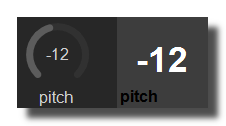 Example with 2 design different styles.
knob color
Color of the arc that shows the knob position (all the arc styles). The tick line and the point use the tick color. When the quick color is changed, it becomes a lighter version of the knob color.
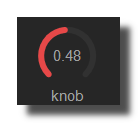 Red knob example.
tick color
Color of the tick line and of the point drawn at the knob position (styles containing tick or point). When the quick color is changed, it takes the same color as knob color; in patches saved with old versions of Usine it is also set to the knob color when loading.
knob style
Design layout of the knob cursor:
- arc: an arc drawn from the start of the knob range (left end) up to the current position.
- arc symmetric: an arc drawn from the top of the knob to the current position, so it grows to the left or to the right of the top; suited to bipolar values.
- point: a small disc at the current position, see point size.
- tick only: a radial line at the current position, see line size.
- arc + tick: the arc plus the tick line.
- arc symmetric + tick: the symmetric arc plus the tick line.
- arc + tick + point: the arc, the tick line and the point.
- arc symmetric + tick + point: the symmetric arc, the tick line and the point.
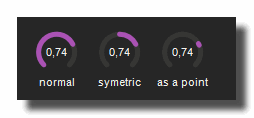 examples of design options
cursor width
Thickness of the knob cursor: the position arc, the background arc and the tick line. From 0 to 1 (default 0.3), as a fraction of a quarter of the knob height. A thicker cursor reduces the radius of the arc, which is always drawn inside the knob area.
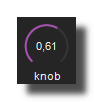 Thin cursor width
rounded cursor
When ON (default), the ends of the arcs and of the tick line are rounded; when OFF they are flat.
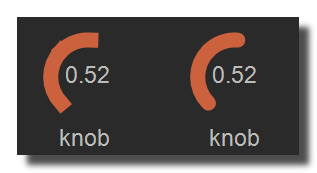 *Example of rounded cursor.
knob aperture
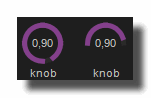
Size of the gap left at the bottom of the knob range, from 0 to 1 (default 0.5): 0 = no gap, the arc can run over a full 360 degrees; 0.5 = 90 degree gap, the classic knob with a 270 degree range; 1 = 180 degree gap, the range is the top half circle only. The range is always centered on the top of the knob, the minimum value at its left end and the maximum at its right end.
line size
Length of the tick line as a fraction of the knob radius, from 0 to 1: 1 draws the line from the center of the knob to the arc, smaller values draw a shorter line that ends at the arc (0.5 = half the radius). A new knob starts at 1. Only used by the styles containing tick.
point size
Size of the point drawn at the knob position, from 0 to 1 (default 0.5): at 1 the radius of the point is 10% of the knob width. Only used by the styles containing point.
draw back knob cursor
When ON (default), the whole knob range (from the start to the end of the knob aperture) is drawn as an arc in the back knob cursor color behind the position cursor, so the unused part of the range stays visible. When OFF, only the position cursor is drawn. Requires show knob ON.
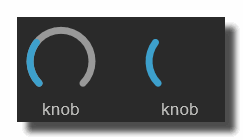 Example with this option ON and OFF.
back knob cursor color
Color of the background arc (outline circle). When the quick color is changed, it becomes a darker version of the knob color.
center circle
draw center circle
Displays or not a circle in the center of the knob, inside the cursor arc. OFF by default. Its look depends on solid color center circle, circle color, circle size and add a transparency effect.
add a transparency effect
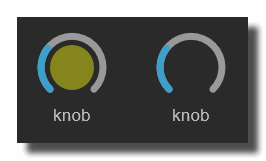
When ON, the opacity of the center circle follows the knob position: fully transparent at the minimum value, fully opaque at the maximum value. When OFF, the circle is always opaque.
circle color
Color of the center circle: fill color when solid color center circle is ON, outline color when it is OFF. When the quick color is changed, it becomes a darker version of the knob color.
draw center circle parameter must be ON.
Example with yellow center circle.
solid color center circle
When ON (default), the center circle is filled with the circle color; when OFF, only a 2-pixel outline is drawn.
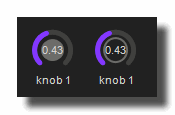 Example with this option ON and OFF.
circle size
Size of the center circle relative to the space available inside the cursor arc, from 0.1 to 4 (default 1): 1 fills the inside of the arc, smaller values draw a smaller circle, values above 1 draw a circle larger than the arc.
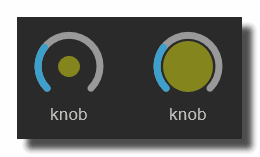 Example with small and large value for the yellow center circle.
version 7.0.250921
Edit All Pages