global
global
mouse editing enabled
Determines if the value of the control can be modified by the user with the mouse or the touch screen. When OFF, the control still displays its value and can be modified by its inlets, remotes and presets, but clicks and drags on it are ignored. Useful to build read-only displays.
This setting is not saved in design templates.
receive mouse info
When ON, the control receives mouse information (often called hit-test). When OFF, the control is transparent to the mouse: clicks pass through it to the control located behind. This is useful when controls overlap, only the topmost control with receive mouse info ON gets the mouse events.
This setting is not saved in design templates.
is visible
Sets or gets the visibility of the control. When OFF the control is hidden but keeps processing its value. Typically exposed as an inlet to show or hide parts of an interface from the patch.
global color
Main color of the control. When changed, Usine recomputes all the other colors of the control (background, border, caption, cursor, etc.) with contrasted shades derived from this color, and propagates the change to the child controls of a panel unless they are ignored in parent global color.
ignored in parent global color
When ON, the global color of this control is not modified when the global color of its parent panel, patch or rack changes. Use it to keep a specific color on one control inside a recolored group.
design template name
Name of the design template (a snapshot of the design tab settings) applied when the control is created. The template files are searched in /Resources/Templates/Design and /Config/Templates/Design. Setting a new name reloads the design settings from that file.
The name can be given without extension, ie. LIGHT CLASS instead of LIGHT CLASS.tuknob_tab_design.
Only visible in god mode.
z order
Determines the drawing order of the control relatively to the other controls of the same container:
- normal: the control is drawn in its creation order,
- front: the control is always brought to the front, above all the other controls,
- back: the control is always sent to the back, behind all the other controls.
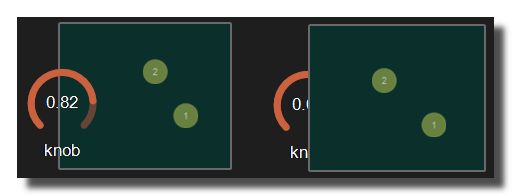 Example with the first knob on top.
opacity
Opacity of the whole control from 0 to 1 (default 1), applied to its background, border, caption and drawing. The opacity is multiplied with the opacity of the parent containers.
0 will give a totally transparent control so invisible.
blur softness
Amount of blur applied to the drawing of the control, from 0 (no blur) to 5.
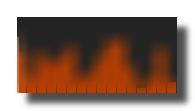 Example of blur.
Be careful, the blur softness use shaders which are not supported by all graphic cards. Can crash Usine.
version 7.0.250921
Edit All Pages