background
background
background color
Background color of the control, used to fill its whole surface behind the caption, the value and the drawing of the control. When the control is disabled the color is dimmed, and when the mouse is over it (with the mouse over effect ON) a slightly lighter shade is drawn.
transparent option must be OFF.
 Blue background color example.
transparent
When ON, the background of the control is not painted at all, so the controls or the patch located behind it remain visible. The background color is ignored and the mouse over highlight uses the global mouse-over color instead of a lighter shade of the background.
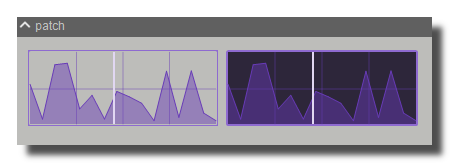 Example, the first module is transparent.
remote highlight color
Color of the contour flashed around the control when its value is modified by a remote source (MIDI, OSC, keyboard, etc.). The contour is drawn for about 100 ms after each remote change. By default it is a lighter shade of the module's quick color. The flash can be disabled globally by the disable remote highlight expert policy.
image file
Optional image drawn as the background of the control, behind the control drawing. Click to choose the file. The image is drawn with the image fit mode and the control opacity.
Only PNG, JPEG and BMP formats are supported. Use [ctrl+click] to reset.
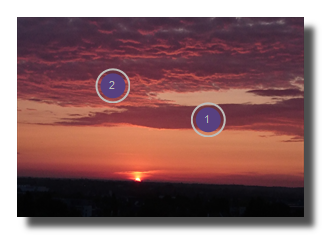 Example on an panel-xy-pad.
image fit mode
Determines how the image file is resized to the size of the control:
- proportional left aligned: the image is scaled to the height of the control, keeps its aspect ratio and is aligned on the left,
- scaled: the image is stretched to the full size of the control (default),
- original: the image keeps its original pixel size and is drawn from the top left corner,
- clipped: the image keeps its aspect ratio and is fitted entirely inside the control,
- scaled with borders: the image is stretched to the size of the control minus its border width,
- centered: the image keeps its aspect ratio, covers the whole control and is centered, the parts outside the control are cropped.
svg filename
Name of an SVG vector file drawn in the background of the control, above the image file. The path is scaled to the size of the control, so the drawing stays sharp at any size.
svg fill color
Color used to fill the shapes of the SVG. Use a fully transparent color to draw the contour only.
svg stroke color
Color used to draw the contour of the SVG shapes. Use a fully transparent color to disable the contour.
For switches only, a second set of colors (svg fill color 2 and svg stroke color 2) is used when the switch is OFF.
svg stroke width
Width of the contour of the SVG shapes, as a fraction of the smallest dimension of the control (0 to 1, default 0.1). The drawn thickness is one third of that fraction, so 0.1 on a 60 pixels wide control gives a 2 pixels contour.
Use 0 to disable the drawing of the contour.
svg margin
Space left between the border of the control and the SVG drawing, as a fraction of half the smallest dimension of the control (0 to 1, default 0.1). At 1 the drawing collapses to the center of the control.
svg keep aspect ratio
When ON (default), the SVG is scaled uniformly so it keeps its proportions and is centered in the available area. When OFF, the SVG is stretched independently in width and height to fill the whole area inside the svg margin.
version 7.0.250921
Edit All Pages