global
global
edition enabled
Determines if the control can be modified by the user. When OFF, the mouse interaction and modifications are disabled so the user can't change the value.
is visible
Sets or get the visibility of the control.
global color
Global color of the control. Usine will choose the best contrasted colors according the global color.
ignored in parent global color
When ON the global color of the control is not affected (is isolated) when the parent control global color changes.
snapshot name
Name of the snapshot (which contains the visual properties) loaded when the object is created. By default the snapshots files are located in /Resources/Snapshots/ or /Config/Snapshots.
the snapshot name can be without extension ie. LIGHT CLASS instead of LIGHT CLASS.tuknob_tab_design
on top
Determines the Z-order of the control
- normal: the Z-order is the control creation order
- on top: the control appears always on top of all other controls
- backward: the control appears always behind all other controls
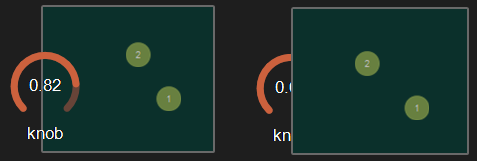 Example with the first knob on top.
opacity
Opacity value of the control.
0 will give a totally transparent control so invisible.
blur softness
Blur amount applied to the object.
 Example of blur.
Be careful, the blur softness use shaders which are not supported by all graphic cards.
It can crash Usine.
version 6.0.241021
Edit All Pages